ADVANCED.md
This file
Path
ADVANCED.md
714 lines · 28.4 KiB · Markdown
Last changed by
Clean up non-ascii charactersJunegunn Choibefore adoption8b66489
History of this fileTake it
1Advanced fzf examples2======================34* *Last update: 2025/02/02*5* *Requires fzf 0.59.0 or later*67---89<!-- vim-markdown-toc GFM -->1011* [Introduction](#introduction)12* [Display modes](#display-modes)13 * [`--height`](#--height)14 * [`--tmux`](#--tmux)15* [Dynamic reloading of the list](#dynamic-reloading-of-the-list)16 * [Updating the list of processes by pressing CTRL-R](#updating-the-list-of-processes-by-pressing-ctrl-r)17 * [Toggling between data sources](#toggling-between-data-sources)18 * [Toggling with a single key binding](#toggling-with-a-single-key-binding)19* [Ripgrep integration](#ripgrep-integration)20 * [Using fzf as the secondary filter](#using-fzf-as-the-secondary-filter)21 * [Using fzf as interactive Ripgrep launcher](#using-fzf-as-interactive-ripgrep-launcher)22 * [Switching to fzf-only search mode](#switching-to-fzf-only-search-mode)23 * [Switching between Ripgrep mode and fzf mode](#switching-between-ripgrep-mode-and-fzf-mode)24 * [Switching between Ripgrep mode and fzf mode using a single key binding](#switching-between-ripgrep-mode-and-fzf-mode-using-a-single-key-binding)25 * [Controlling Ripgrep search and fzf search simultaneously](#controlling-ripgrep-search-and-fzf-search-simultaneously)26* [Log tailing](#log-tailing)27* [Key bindings for git objects](#key-bindings-for-git-objects)28 * [Files listed in `git status`](#files-listed-in-git-status)29 * [Branches](#branches)30 * [Commit hashes](#commit-hashes)31* [Color themes](#color-themes)32 * [fzf Theme Playground](#fzf-theme-playground)33 * [Generating fzf color theme from Vim color schemes](#generating-fzf-color-theme-from-vim-color-schemes)3435<!-- vim-markdown-toc -->3637Introduction38------------3940fzf is an interactive [Unix filter][filter] program that is designed to be41used with other Unix tools. It reads a list of items from the standard input,42allows you to select a subset of the items, and prints the selected ones to43the standard output. You can think of it as an interactive version of *grep*,44and it's already useful even if you don't know any of its options.4546```sh47# 1. ps: Feed the list of processes to fzf48# 2. fzf: Interactively select a process using fuzzy matching algorithm49# 3. awk: Take the PID from the selected line50# 3. kill: Kill the process with the PID51ps -ef | fzf | awk '{print $2}' | xargs kill -952```5354[filter]: https://en.wikipedia.org/wiki/Filter_(software)5556While the above example succinctly summarizes the fundamental concept of fzf,57you can build much more sophisticated interactive workflows using fzf once you58learn its wide variety of features.5960- To see the full list of options and features, see `man fzf`61- To see the latest additions, see [CHANGELOG.md](CHANGELOG.md)6263This document will guide you through some examples that will familiarize you64with the advanced features of fzf.6566Display modes67-------------6869### `--height`7071fzf by default opens in fullscreen mode, but it's not always desirable.72Oftentimes, you want to see the current context of the terminal while using73fzf. `--height` is an option for opening fzf below the cursor in74non-fullscreen mode so you can still see the previous commands and their75results above it.7677```sh78fzf --height=40%79```80818283You might also want to experiment with other layout options such as84`--layout=reverse`, `--info=inline`, `--border`, `--margin`, etc.8586```sh87fzf --height=40% --layout=reverse88fzf --height=40% --layout=reverse --info=inline89fzf --height=40% --layout=reverse --info=inline --border90fzf --height=40% --layout=reverse --info=inline --border --margin=191fzf --height=40% --layout=reverse --info=inline --border --margin=1 --padding=192```93949596*(See man page to see the full list of options)*9798But you definitely don't want to repeat `--height=40% --layout=reverse99--info=inline --border --margin=1 --padding=1` every time you use fzf. You100could write a wrapper script or shell alias, but there is an easier option.101Define `$FZF_DEFAULT_OPTS` like so:102103```sh104export FZF_DEFAULT_OPTS="--height=40% --layout=reverse --info=inline --border --margin=1 --padding=1"105```106107### `--tmux`108109(Requires tmux 3.3 or later)110111If you're using tmux, you can open fzf in a tmux popup using `--tmux` option.112113```sh114# Open fzf in a tmux popup at the center of the screen with 70% width and height115fzf --tmux 70%116```117118119120`--tmux` option is silently ignored if you're not on tmux. So if you're trying121to avoid opening fzf in fullscreen, try specifying both `--height` and `--tmux`.122123```sh124# --tmux is specified later so it takes precedence over --height when on tmux.125# If you're not on tmux, --tmux is ignored and --height is used instead.126fzf --height 70% --tmux 70%127```128129You can also specify the position, width, and height of the popup window in130the following format:131132* `[center|top|bottom|left|right][,SIZE[%]][,SIZE[%][,border-native]]`133134```sh135# 100% width and 60% height136fzf --tmux 100%,60% --border horizontal137```138139140141```sh142# On the right (50% width)143fzf --tmux right144```145146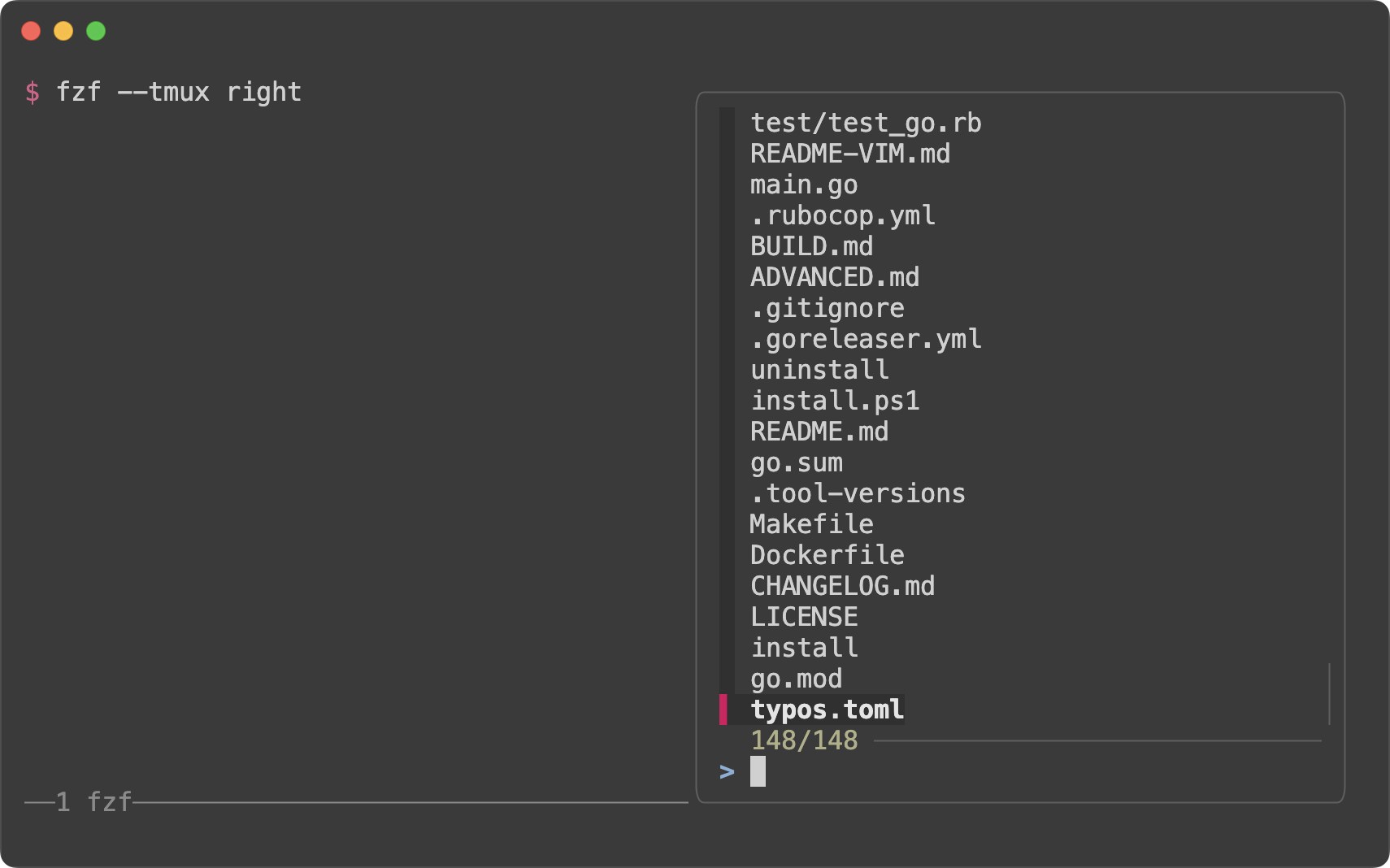147148```sh149# On the left (40% width and 70% height)150fzf --tmux left,40%,70%151```152153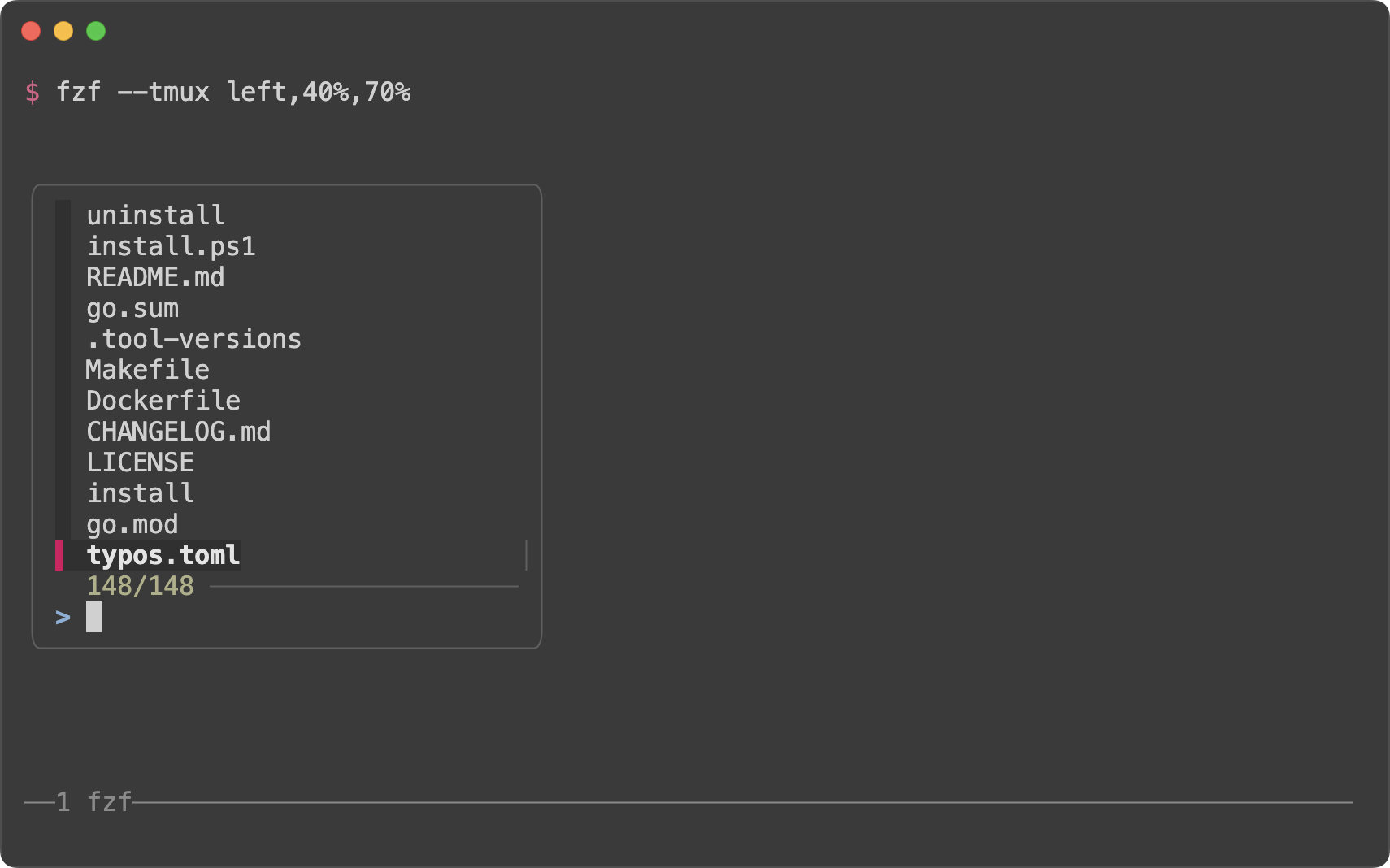154155> [!TIP]156> You might also want to check out my tmux plugins which support this popup157> window layout.158>159> - https://github.com/junegunn/tmux-fzf-url160> - https://github.com/junegunn/tmux-fzf-maccy161162Dynamic reloading of the list163-----------------------------164165fzf can dynamically update the candidate list using an arbitrary program with166`reload` bindings (The design document for `reload` can be found167[here][reload]).168169[reload]: https://github.com/junegunn/fzf/issues/1750170171### Updating the list of processes by pressing CTRL-R172173This example shows how you can set up a binding for dynamically updating the174list without restarting fzf.175176```sh177(date; ps -ef) |178 fzf --bind='ctrl-r:reload(date; ps -ef)' \179 --header=$'Press CTRL-R to reload\n\n' --header-lines=2 \180 --preview='echo {}' --preview-window=down,3,wrap \181 --layout=reverse --height=80% | awk '{print $2}' | xargs kill -9182```183184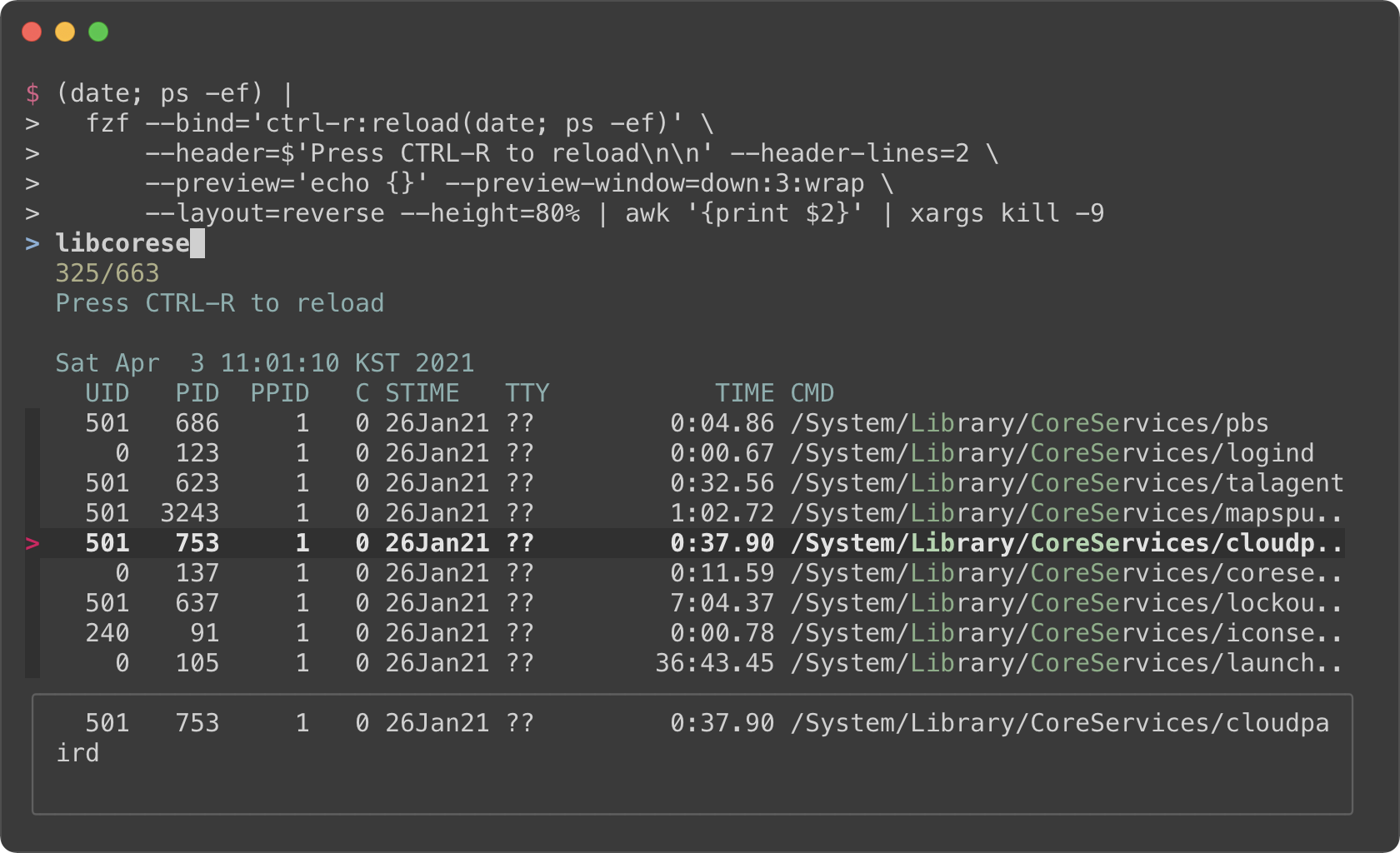185186- The initial command is `(date; ps -ef)`. It prints the current date and187 time, and the list of the processes.188- With `--header` option, you can show any message as the fixed header.189- To disallow selecting the first two lines (`date` and `ps` header), we use190 `--header-lines=2` option.191- `--bind='ctrl-r:reload(date; ps -ef)'` binds CTRL-R to `reload` action that192 runs `date; ps -ef`, so we can update the list of the processes by pressing193 CTRL-R.194- We use simple `echo {}` preview option, so we can see the entire line on the195 preview window below even if it's too long196197### Toggling between data sources198199You're not limited to just one reload binding. Set up multiple bindings so200you can switch between data sources.201202```sh203find * | fzf --prompt 'All> ' \204 --header 'CTRL-D: Directories / CTRL-F: Files' \205 --bind 'ctrl-d:change-prompt(Directories> )+reload(find * -type d)' \206 --bind 'ctrl-f:change-prompt(Files> )+reload(find * -type f)'207```208209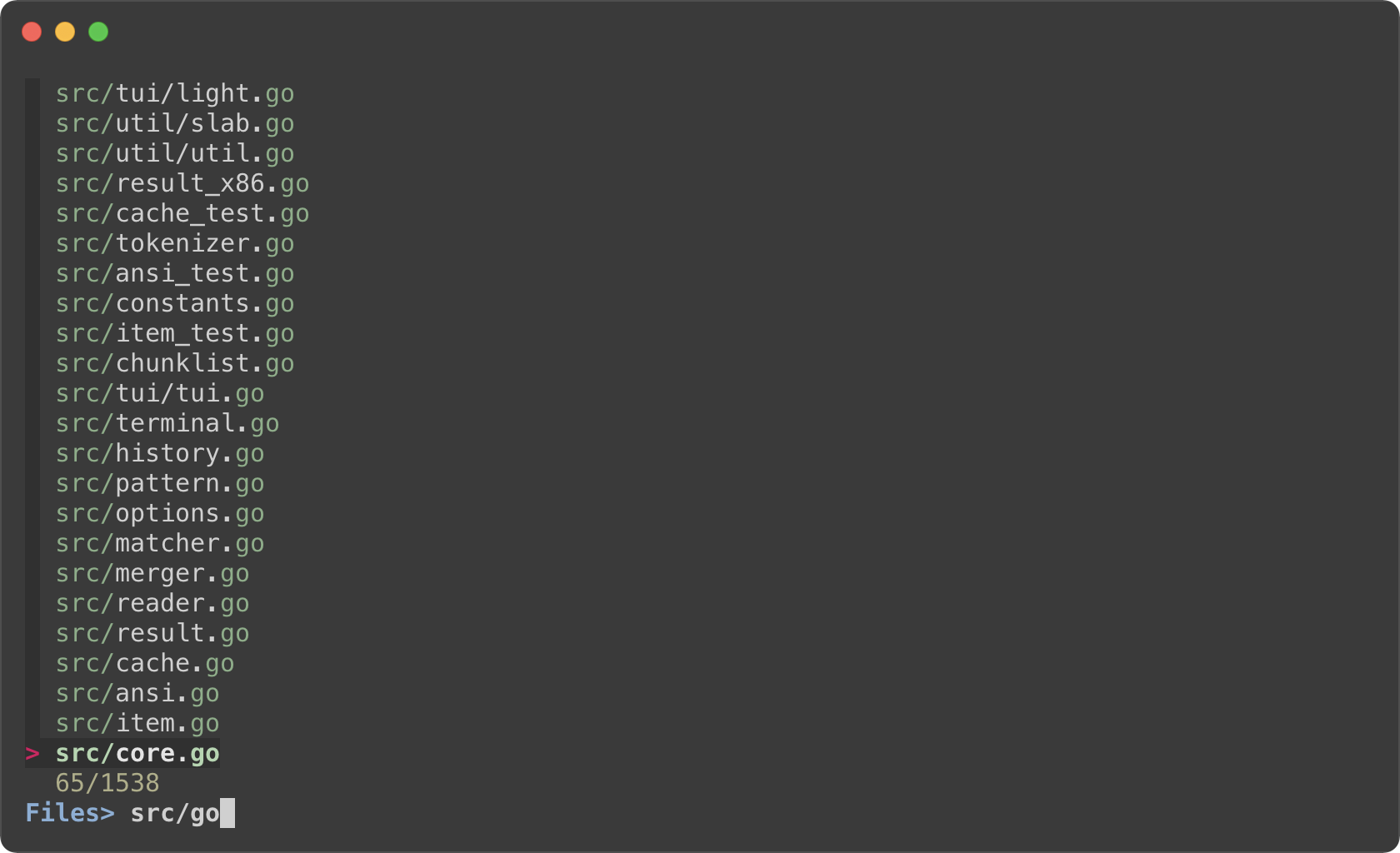210211212213### Toggling with a single key binding214215The above example uses two different key bindings to toggle between two modes,216but can we just use a single key binding?217218To make a key binding behave differently each time it is pressed, we need:2192201. a way to store the current state. i.e. "which mode are we in?"2212. and a way to dynamically perform different actions depending on the state.222223The following example shows how to 1. store the current mode in the prompt224string, 2. and use this information (`$FZF_PROMPT`) to determine which225actions to perform using the `transform` action.226227```sh228fd --type file |229 fzf --prompt 'Files> ' \230 --header 'CTRL-T: Switch between Files/Directories' \231 --bind 'ctrl-t:transform:[[ ! $FZF_PROMPT =~ Files ]] &&232 echo "change-prompt(Files> )+reload(fd --type file)" ||233 echo "change-prompt(Directories> )+reload(fd --type directory)"' \234 --preview '[[ $FZF_PROMPT =~ Files ]] && bat --color=always {} || tree -C {}'235```236237Ripgrep integration238-------------------239240### Using fzf as the secondary filter241242* Requires [bat][bat]243* Requires [Ripgrep][rg]244245[bat]: https://github.com/sharkdp/bat246[rg]: https://github.com/BurntSushi/ripgrep247248fzf is pretty fast for filtering a list that you will rarely have to think249about its performance. But it is not the right tool for searching for text250inside many large files, and in that case you should definitely use something251like [Ripgrep][rg].252253In the next example, Ripgrep is the primary filter that searches for the given254text in files, and fzf is used as the secondary fuzzy filter that adds255interactivity to the workflow. And we use [bat][bat] to show the matching line in256the preview window.257258This is a bash script and it will not run as expected on other non-compliant259shells. To avoid the compatibility issue, let's save this snippet as a script260file called `rfv`.261262```bash263#!/usr/bin/env bash264265# 1. Search for text in files using Ripgrep266# 2. Interactively narrow down the list using fzf267# 3. Open the file in Vim268rg --color=always --line-number --no-heading --smart-case "${*:-}" |269 fzf --ansi \270 --color "hl:-1:underline,hl+:-1:underline:reverse" \271 --delimiter : \272 --preview 'bat --color=always {1} --highlight-line {2}' \273 --preview-window 'up,60%,border-bottom,+{2}+3/3,~3' \274 --bind 'enter:become(vim {1} +{2})'275```276277And run it with an initial query string.278279```sh280# Make the script executable281chmod +x rfv282283# Run it with the initial query "algo"284./rfv algo285```286287> Ripgrep will perform the initial search and list all the lines that contain288`algo`. Then we further narrow down the list on fzf.289290291292I know it's a lot to digest, let's try to break down the code.293294- Ripgrep prints the matching lines in the following format295 ```296 man/man1/fzf.1:54:.BI "--algo=" TYPE297 man/man1/fzf.1:55:Fuzzy matching algorithm (default: v2)298 man/man1/fzf.1:58:.BR v2 " Optimal scoring algorithm (quality)"299 src/pattern_test.go:7: "github.com/junegunn/fzf/src/algo"300 ```301 The first token delimited by `:` is the file path, and the second token is302 the line number of the matching line. They respectively correspond to `{1}`303 and `{2}` in the preview command.304 - `--preview 'bat --color=always {1} --highlight-line {2}'`305- As we run `rg` with `--color=always` option, we should tell fzf to parse306 ANSI color codes in the input by setting `--ansi`.307- We customize how fzf colors various text elements using `--color` option.308 `-1` tells fzf to keep the original color from the input. See `man fzf` for309 available color options.310- The value of `--preview-window` option consists of 5 components delimited311 by `,`312 1. `up` -- Position of the preview window313 1. `60%` -- Size of the preview window314 1. `border-bottom` -- Preview window border only on the bottom side315 1. `+{2}+3/3` -- Scroll offset of the preview contents316 1. `~3` -- Fixed header317- Let's break down the latter two. We want to display the bat output in the318 preview window with a certain scroll offset so that the matching line is319 positioned near the center of the preview window.320 - `+{2}` -- The base offset is extracted from the second token321 - `+3` -- We add 3 lines to the base offset to compensate for the header322 part of `bat` output323 - ```324 ───────┬──────────────────────────────────────────────────────────325 │ File: CHANGELOG.md326 ───────┼──────────────────────────────────────────────────────────327 1 │ CHANGELOG328 2 │ =========329 3 │330 4 │ 0.26.0331 5 │ ------332 ```333 - `/3` adjusts the offset so that the matching line is shown at a third334 position in the window335 - `~3` makes the top three lines fixed header so that they are always336 visible regardless of the scroll offset337- Instead of using shell script to process the final output of fzf, we use338 `become(...)` action which was added in [fzf 0.38.0][0.38.0] to turn fzf339 into a new process that opens the file with `vim` (`vim {1}`) and move the340 cursor to the line (`+{2}`).341342[0.38.0]: https://github.com/junegunn/fzf/blob/master/CHANGELOG.md#0380343344### Using fzf as interactive Ripgrep launcher345346We have learned that we can bind `reload` action to a key (e.g.347`--bind=ctrl-r:execute(ps -ef)`). In the next example, we are going to **bind348`reload` action to `change` event** so that whenever the user *changes* the349query string on fzf, `reload` action is triggered.350351Here is a variation of the above `rfv` script. fzf will restart Ripgrep every352time the user updates the query string on fzf. Searching and filtering is353completely done by Ripgrep, and fzf merely provides the interactive interface.354So we lose the "fuzziness", but the performance will be better on larger355projects, and it will free up memory as you narrow down the results.356357```bash358#!/usr/bin/env bash359360# 1. Search for text in files using Ripgrep361# 2. Interactively restart Ripgrep with reload action362# 3. Open the file in Vim363RG_PREFIX="rg --column --line-number --no-heading --color=always --smart-case "364INITIAL_QUERY="${*:-}"365fzf --ansi --disabled --query "$INITIAL_QUERY" \366 --bind "start:reload:$RG_PREFIX {q} || true" \367 --bind "change:reload:sleep 0.1; $RG_PREFIX {q} || true" \368 --delimiter : \369 --preview 'bat --color=always {1} --highlight-line {2}' \370 --preview-window 'up,60%,border-bottom,+{2}+3/3,~3' \371 --bind 'enter:become(vim {1} +{2})'372```373374375376- Instead of starting fzf in the usual `rg ... | fzf` form, we make it start377 the initial Ripgrep process immediately via `start:reload` binding for the378 consistency of the code.379- Filtering is no longer a responsibility of fzf; hence `--disabled`380- `{q}` in the reload command evaluates to the query string on fzf prompt.381- `sleep 0.1` in the reload command is for "debouncing". This small delay will382 reduce the number of intermediate Ripgrep processes while we're typing in383 a query.384385### Switching to fzf-only search mode386387In the previous example, we lost fuzzy matching capability as we completely388delegated search functionality to Ripgrep. But we can dynamically switch to389fzf-only search mode by *"unbinding"* `reload` action from `change` event.390391```sh392#!/usr/bin/env bash393394# Two-phase filtering with Ripgrep and fzf395#396# 1. Search for text in files using Ripgrep397# 2. Interactively restart Ripgrep with reload action398# * Press alt-enter to switch to fzf-only filtering399# 3. Open the file in Vim400RG_PREFIX="rg --column --line-number --no-heading --color=always --smart-case "401INITIAL_QUERY="${*:-}"402fzf --ansi --disabled --query "$INITIAL_QUERY" \403 --bind "start:reload:$RG_PREFIX {q}" \404 --bind "change:reload:sleep 0.1; $RG_PREFIX {q} || true" \405 --bind "alt-enter:unbind(change,alt-enter)+change-prompt(2. fzf> )+enable-search+clear-query" \406 --color "hl:-1:underline,hl+:-1:underline:reverse" \407 --prompt '1. ripgrep> ' \408 --delimiter : \409 --preview 'bat --color=always {1} --highlight-line {2}' \410 --preview-window 'up,60%,border-bottom,+{2}+3/3,~3' \411 --bind 'enter:become(vim {1} +{2})'412```413414* Phase 1. Filtering with Ripgrep415416* Phase 2. Filtering with fzf417418419- We added `--prompt` option to show that fzf is initially running in "Ripgrep420 launcher mode".421- We added `alt-enter` binding that422 1. unbinds `change` event, so Ripgrep is no longer restarted on key press423 2. changes the prompt to `2. fzf>`424 3. enables search functionality of fzf425 4. clears the current query string that was used to start Ripgrep process426 5. and unbinds `alt-enter` itself as this is a one-off event427- We reverted `--color` option for customizing how the matching chunks are428 displayed in the second phase429430### Switching between Ripgrep mode and fzf mode431432[fzf 0.30.0][0.30.0] added `rebind` action so we can "rebind" the bindings433that were previously "unbound" via `unbind`.434435This is an improved version of the previous example that allows us to switch436between Ripgrep launcher mode and fzf-only filtering mode via CTRL-R and437CTRL-F.438439```sh440#!/usr/bin/env bash441442# Switch between Ripgrep launcher mode (CTRL-R) and fzf filtering mode (CTRL-F)443rm -f /tmp/rg-fzf-{r,f}444RG_PREFIX="rg --column --line-number --no-heading --color=always --smart-case "445INITIAL_QUERY="${*:-}"446fzf --ansi --disabled --query "$INITIAL_QUERY" \447 --bind "start:reload($RG_PREFIX {q})+unbind(ctrl-r)" \448 --bind "change:reload:sleep 0.1; $RG_PREFIX {q} || true" \449 --bind "ctrl-f:unbind(change,ctrl-f)+change-prompt(2. fzf> )+enable-search+rebind(ctrl-r)+transform-query(echo {q} > /tmp/rg-fzf-r; cat /tmp/rg-fzf-f)" \450 --bind "ctrl-r:unbind(ctrl-r)+change-prompt(1. ripgrep> )+disable-search+reload($RG_PREFIX {q} || true)+rebind(change,ctrl-f)+transform-query(echo {q} > /tmp/rg-fzf-f; cat /tmp/rg-fzf-r)" \451 --color "hl:-1:underline,hl+:-1:underline:reverse" \452 --prompt '1. ripgrep> ' \453 --delimiter : \454 --header '╱ CTRL-R (ripgrep mode) ╱ CTRL-F (fzf mode) ╱' \455 --preview 'bat --color=always {1} --highlight-line {2}' \456 --preview-window 'up,60%,border-bottom,+{2}+3/3,~3' \457 --bind 'enter:become(vim {1} +{2})'458```459460- To restore the query string when switching between modes, we store the461 current query in `/tmp/rg-fzf-{r,f}` files and restore the query using462 `transform-query` action which was added in [fzf 0.36.0][0.36.0].463- Also note that we unbind `ctrl-r` binding on `start` event which is464 triggered once when fzf starts.465466[0.30.0]: https://github.com/junegunn/fzf/blob/master/CHANGELOG.md#0300467[0.36.0]: https://github.com/junegunn/fzf/blob/master/CHANGELOG.md#0360468469### Switching between Ripgrep mode and fzf mode using a single key binding470471In contrast to the previous version, we use just one hotkey to toggle between472ripgrep and fzf mode. This is achieved by using the `$FZF_PROMPT` as a state473within the `transform` action, a feature introduced in [fzf 0.45.0][0.45.0]. A474more detailed explanation of this feature can be found in a previous section -475[Toggling with a single keybinding](#toggling-with-a-single-key-binding).476477[0.45.0]: https://github.com/junegunn/fzf/blob/master/CHANGELOG.md#0450478479When using the `transform` action, the placeholder (`\{q}`) should be escaped to480prevent immediate evaluation.481482```sh483#!/usr/bin/env bash484485# Switch between Ripgrep mode and fzf filtering mode (CTRL-T)486rm -f /tmp/rg-fzf-{r,f}487RG_PREFIX="rg --column --line-number --no-heading --color=always --smart-case "488INITIAL_QUERY="${*:-}"489fzf --ansi --disabled --query "$INITIAL_QUERY" \490 --bind "start:reload:$RG_PREFIX {q}" \491 --bind "change:reload:sleep 0.1; $RG_PREFIX {q} || true" \492 --bind 'ctrl-t:transform:[[ ! $FZF_PROMPT =~ ripgrep ]] &&493 echo "rebind(change)+change-prompt(1. ripgrep> )+disable-search+transform-query:echo \{q} > /tmp/rg-fzf-f; cat /tmp/rg-fzf-r" ||494 echo "unbind(change)+change-prompt(2. fzf> )+enable-search+transform-query:echo \{q} > /tmp/rg-fzf-r; cat /tmp/rg-fzf-f"' \495 --color "hl:-1:underline,hl+:-1:underline:reverse" \496 --prompt '1. ripgrep> ' \497 --delimiter : \498 --header 'CTRL-T: Switch between ripgrep/fzf' \499 --preview 'bat --color=always {1} --highlight-line {2}' \500 --preview-window 'up,60%,border-bottom,+{2}+3/3,~3' \501 --bind 'enter:become(vim {1} +{2})'502```503504### Controlling Ripgrep search and fzf search simultaneously505506`search` and `transform-search` action allow you to trigger an fzf search with507an arbitrary query string. This frees fzf from strictly following the prompt508input, enabling custom search syntax.509510In the example below, `transform` action is used to conditionally trigger511`reload` for ripgrep, followed by `search` for fzf. The first word of the512query initiates the Ripgrep process to generate the initial results, while the513remainder of the query is passed to fzf for secondary filtering.514515```sh516#!/usr/bin/env bash517518export TEMP=$(mktemp -u)519trap 'rm -f "$TEMP"' EXIT520521INITIAL_QUERY="${*:-}"522TRANSFORMER='523 rg_pat={q:1} # The first word is passed to ripgrep524 fzf_pat={q:2..} # The rest are passed to fzf525526 if ! [[ -r "$TEMP" ]] || [[ $rg_pat != $(cat "$TEMP") ]]; then527 echo "$rg_pat" > "$TEMP"528 printf "reload:sleep 0.1; rg --column --line-number --no-heading --color=always --smart-case %q || true" "$rg_pat"529 fi530 echo "+search:$fzf_pat"531'532fzf --ansi --disabled --query "$INITIAL_QUERY" \533 --with-shell 'bash -c' \534 --bind "start,change:transform:$TRANSFORMER" \535 --color "hl:-1:underline,hl+:-1:underline:reverse" \536 --delimiter : \537 --preview 'bat --color=always {1} --highlight-line {2}' \538 --preview-window 'up,60%,border-line,+{2}+3/3,~3' \539 --bind 'enter:become(vim {1} +{2})'540```541542Log tailing543-----------544545fzf can run long-running preview commands and render partial results before546completion. And when you specify `follow` flag in `--preview-window` option,547fzf will "`tail -f`" the result, automatically scrolling to the bottom.548549```bash550# With "follow", preview window will automatically scroll to the bottom.551# "\033[2J" is an ANSI escape sequence for clearing the screen.552# When fzf reads this code it clears the previous preview contents.553fzf --preview-window follow --preview 'for i in $(seq 100000); do554 echo "$i"555 sleep 0.01556 (( i % 300 == 0 )) && printf "\033[2J"557done'558```559560561562Admittedly, that was a silly example. Here's a practical one for browsing563Kubernetes pods.564565```bash566pods() {567 command='kubectl get pods --all-namespaces' fzf \568 --info=inline --layout=reverse --header-lines=1 \569 --prompt "$(kubectl config current-context | sed 's/-context$//')> " \570 --header $'╱ Enter (kubectl exec) ╱ CTRL-O (open log in editor) ╱ CTRL-R (reload) ╱\n\n' \571 --bind 'start,ctrl-r:reload:$command' \572 --bind 'ctrl-/:change-preview-window(80%,border-bottom|hidden|)' \573 --bind 'enter:execute:kubectl exec -it --namespace {1} {2} -- bash' \574 --bind 'ctrl-o:execute:${EDITOR:-vim} <(kubectl logs --all-containers --namespace {1} {2})' \575 --preview-window up:follow \576 --preview 'kubectl logs --follow --all-containers --tail=10000 --namespace {1} {2}' "$@"577}578```579580581582- The preview window will *"log tail"* the pod583 - Holding on to a large amount of log will consume a lot of memory. So we584 limited the initial log amount with `--tail=10000`.585- `execute` bindings allow you to run any command without leaving fzf586 - Press enter key on a pod to `kubectl exec` into it587 - Press CTRL-O to open the log in your editor588- Press CTRL-R to reload the pod list589- Press CTRL-/ repeatedly to rotate through a different sets of preview590 window options591 1. `80%,border-bottom`592 1. `hidden`593 1. Empty string after `|` translates to the default options from `--preview-window`594595Key bindings for git objects596----------------------------597598Oftentimes, you want to put the identifiers of various Git object to the599command-line. For example, it is common to write commands like these:600601```sh602git checkout [SOME_COMMIT_HASH or BRANCH or TAG]603git diff [SOME_COMMIT_HASH or BRANCH or TAG] [SOME_COMMIT_HASH or BRANCH or TAG]604```605606[fzf-git.sh](https://github.com/junegunn/fzf-git.sh) project defines a set of607fzf-based key bindings for Git objects. I strongly recommend that you check608them out because they are seriously useful.609610### Files listed in `git status`611612<kbd>CTRL-G</kbd><kbd>CTRL-F</kbd>613614615616### Branches617618<kbd>CTRL-G</kbd><kbd>CTRL-B</kbd>619620621622### Commit hashes623624<kbd>CTRL-G</kbd><kbd>CTRL-H</kbd>625626627628Color themes629------------630631You can customize how fzf colors the text elements with `--color` option. Here632are a few color themes. Note that you need a terminal emulator that can633display 24-bit colors.634635```sh636# junegunn/seoul256.vim (dark)637export FZF_DEFAULT_OPTS='--color=bg+:#3F3F3F,bg:#4B4B4B,border:#6B6B6B,spinner:#98BC99,hl:#719872,fg:#D9D9D9,header:#719872,info:#BDBB72,pointer:#E12672,marker:#E17899,fg+:#D9D9D9,preview-bg:#3F3F3F,prompt:#98BEDE,hl+:#98BC99'638```639640641642```sh643# junegunn/seoul256.vim (light)644export FZF_DEFAULT_OPTS='--color=bg+:#D9D9D9,bg:#E1E1E1,border:#C8C8C8,spinner:#719899,hl:#719872,fg:#616161,header:#719872,info:#727100,pointer:#E12672,marker:#E17899,fg+:#616161,preview-bg:#D9D9D9,prompt:#0099BD,hl+:#719899'645```646647648649```sh650# morhetz/gruvbox651export FZF_DEFAULT_OPTS='--color=bg+:#3c3836,bg:#32302f,spinner:#fb4934,hl:#928374,fg:#ebdbb2,header:#928374,info:#8ec07c,pointer:#fb4934,marker:#fb4934,fg+:#ebdbb2,prompt:#fb4934,hl+:#fb4934'652```653654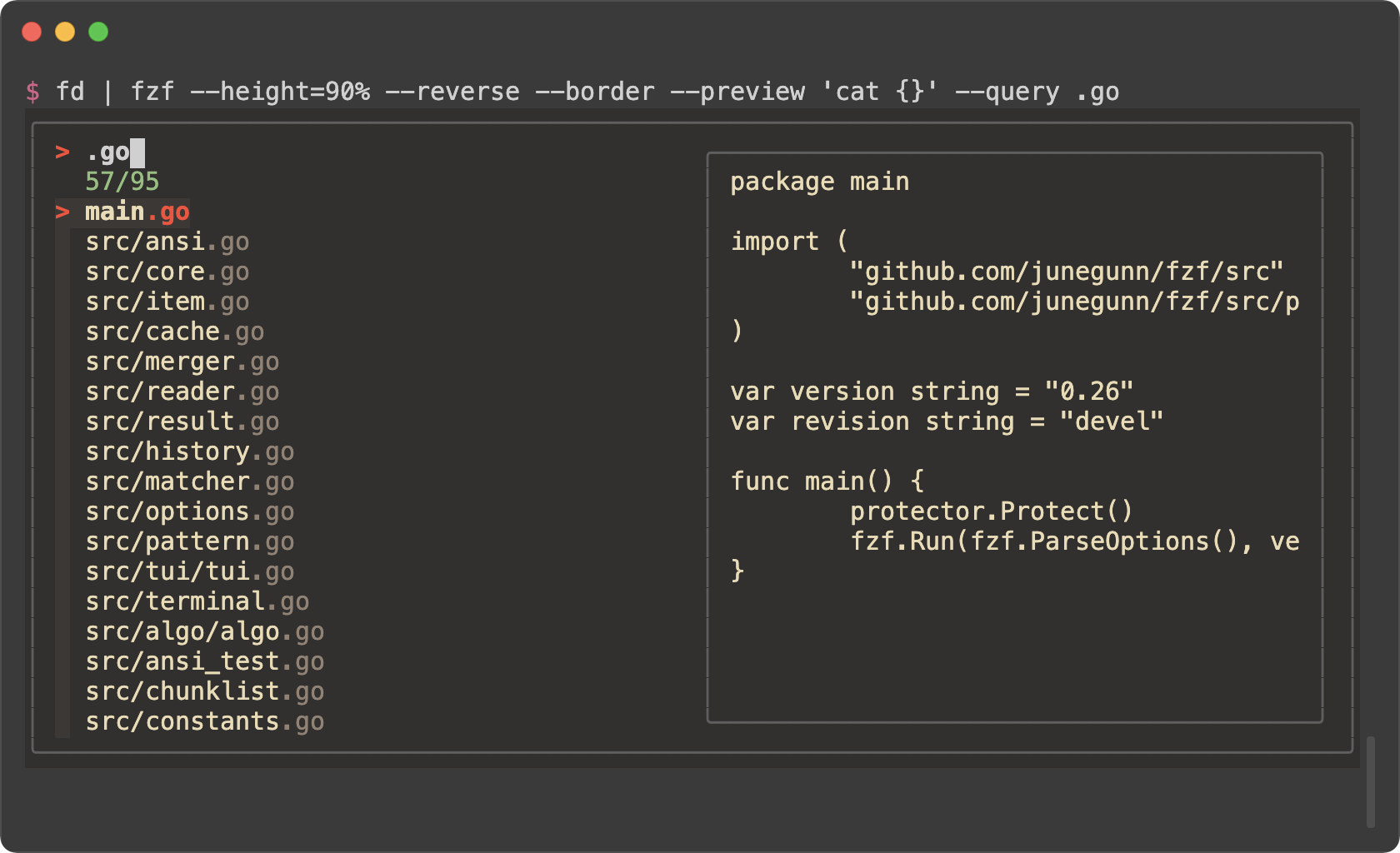655656```sh657# arcticicestudio/nord-vim658export FZF_DEFAULT_OPTS='--color=bg+:#3B4252,bg:#2E3440,spinner:#81A1C1,hl:#616E88,fg:#D8DEE9,header:#616E88,info:#81A1C1,pointer:#81A1C1,marker:#81A1C1,fg+:#D8DEE9,prompt:#81A1C1,hl+:#81A1C1'659```660661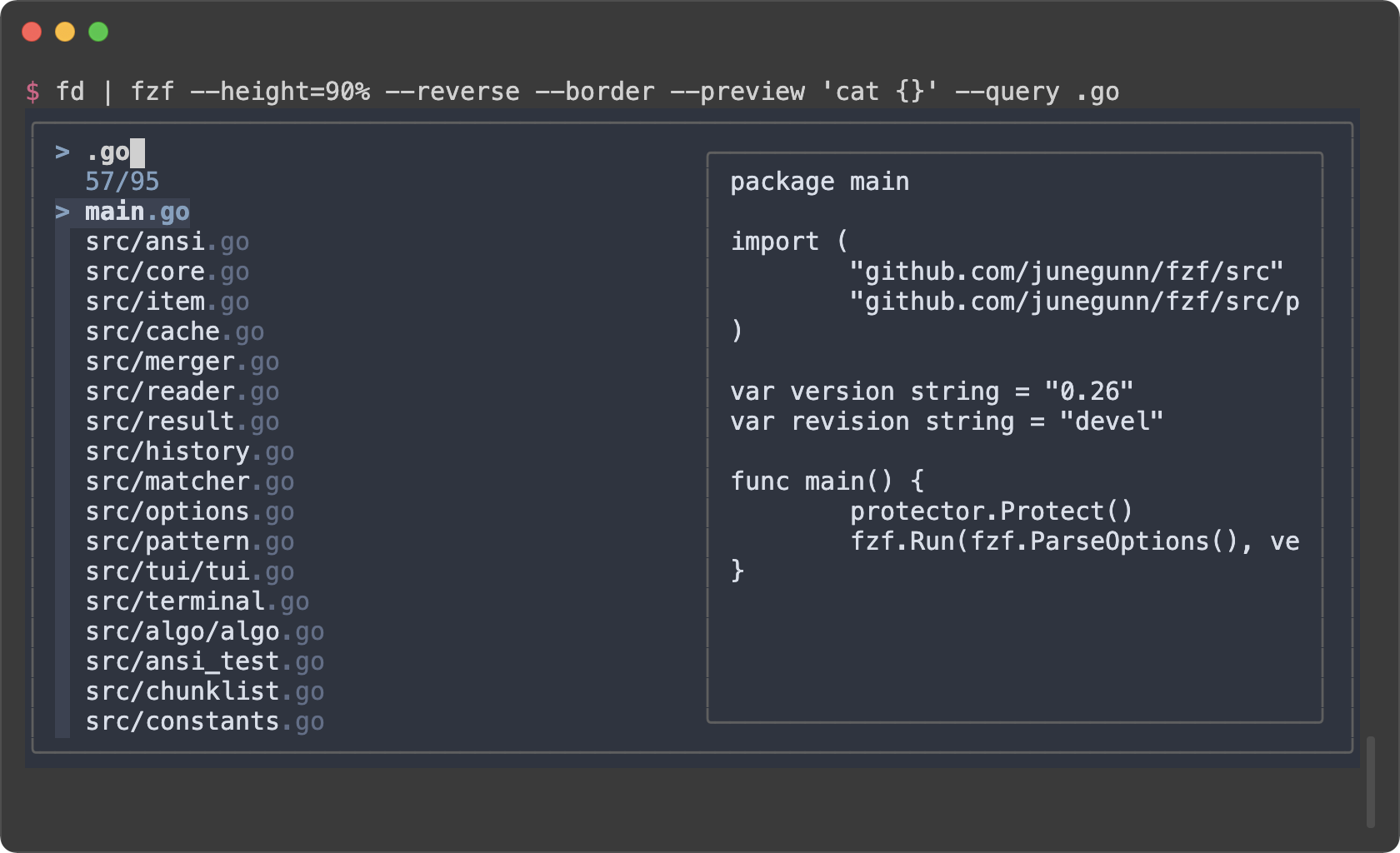662663```sh664# tomasr/molokai665export FZF_DEFAULT_OPTS='--color=bg+:#293739,bg:#1B1D1E,border:#808080,spinner:#E6DB74,hl:#7E8E91,fg:#F8F8F2,header:#7E8E91,info:#A6E22E,pointer:#A6E22E,marker:#F92672,fg+:#F8F8F2,prompt:#F92672,hl+:#F92672'666```667668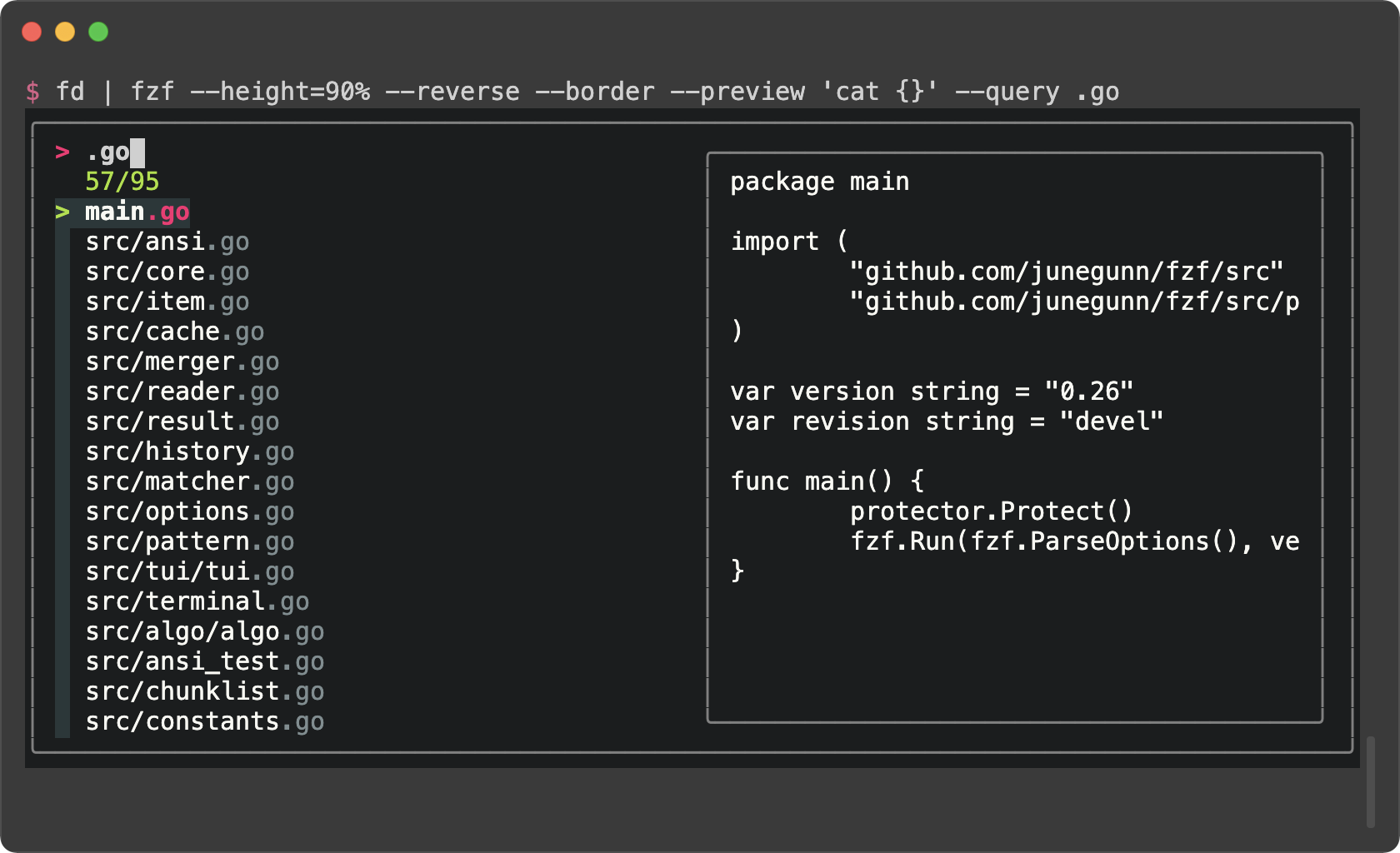669670### fzf Theme Playground671672[fzf Theme Playground](https://vitormv.github.io/fzf-themes/) created by673[Vitor Mello](https://github.com/vitormv) is a webpage where you can674interactively create fzf themes.675676### Generating fzf color theme from Vim color schemes677678The Vim plugin of fzf can generate `--color` option from the current color679scheme according to `g:fzf_colors` variable. You can find the detailed680explanation [here](https://github.com/junegunn/fzf/blob/master/README-VIM.md#explanation-of-gfzf_colors).681682Here is an example. Add this to your Vim configuration file.683684```vim685let g:fzf_colors =686\ { 'fg': ['fg', 'Normal'],687 \ 'bg': ['bg', 'Normal'],688 \ 'preview-bg': ['bg', 'NormalFloat'],689 \ 'hl': ['fg', 'Comment'],690 \ 'fg+': ['fg', 'CursorLine', 'CursorColumn', 'Normal'],691 \ 'bg+': ['bg', 'CursorLine', 'CursorColumn'],692 \ 'hl+': ['fg', 'Statement'],693 \ 'info': ['fg', 'PreProc'],694 \ 'border': ['fg', 'Ignore'],695 \ 'prompt': ['fg', 'Conditional'],696 \ 'pointer': ['fg', 'Exception'],697 \ 'marker': ['fg', 'Keyword'],698 \ 'spinner': ['fg', 'Label'],699 \ 'header': ['fg', 'Comment'] }700```701702Then you can see how the `--color` option is generated by printing the result703of `fzf#wrap()`.704705```vim706:echo fzf#wrap()707```708709Use this command to append `export FZF_DEFAULT_OPTS="..."` line to the end of710the current file.711712```vim713:call append('$', printf('export FZF_DEFAULT_OPTS="%s"', matchstr(fzf#wrap().options, "--color[^']*")))714```