Describe become(...) action and use it to simplify examples
Before adoption: this commit came in with the history the project adopted, so no landing records it.
authored by Junegunn Choi · committed by Junegunn Choi · parent 4e305ec · Browse files · 3 files·+126 added−73 removed
This commit
State
Before adoption: this commit came in with the history the project adopted, so no landing records it.
Diff stats
3 files+126 added−73 removed
- other:+126 added−73 removed
Provenance
- Commit
2701878- Tree
299c94d- Author
Junegunn Choi <junegunn.c@gmail.com>- Committer
Junegunn Choi <junegunn.c@gmail.com>- Parent
4e305ec
3 files changed+126 added−73 removed
modified:ADVANCED.md+63 added-68 removed
1 Advanced fzf examples2 ======================3 4-*(Last update: 2023/02/12)*4+* *Last update: 2023/02/15*5+* *Requires fzf 0.38.0 or above*6 7+---8+9 <!-- vim-markdown-toc GFM -->10 11 * [Introduction](#introduction)12 * [Screen Layout](#screen-layout)10- * [`--height`](#--height)11- * [`fzf-tmux`](#fzf-tmux)12- * [Popup window support](#popup-window-support)13+ * [`--height`](#--height)14+ * [`fzf-tmux`](#fzf-tmux)15+ * [Popup window support](#popup-window-support)16 * [Dynamic reloading of the list](#dynamic-reloading-of-the-list)14- * [Updating the list of processes by pressing CTRL-R](#updating-the-list-of-processes-by-pressing-ctrl-r)15- * [Toggling between data sources](#toggling-between-data-sources)17+ * [Updating the list of processes by pressing CTRL-R](#updating-the-list-of-processes-by-pressing-ctrl-r)18+ * [Toggling between data sources](#toggling-between-data-sources)19 * [Ripgrep integration](#ripgrep-integration)17- * [Using fzf as the secondary filter](#using-fzf-as-the-secondary-filter)18- * [Using fzf as interactive Ripgrep launcher](#using-fzf-as-interactive-ripgrep-launcher)19- * [Switching to fzf-only search mode](#switching-to-fzf-only-search-mode)20- * [Switching between Ripgrep mode and fzf mode](#switching-between-ripgrep-mode-and-fzf-mode)20+ * [Using fzf as the secondary filter](#using-fzf-as-the-secondary-filter)21+ * [Using fzf as interactive Ripgrep launcher](#using-fzf-as-interactive-ripgrep-launcher)22+ * [Switching to fzf-only search mode](#switching-to-fzf-only-search-mode)23+ * [Switching between Ripgrep mode and fzf mode](#switching-between-ripgrep-mode-and-fzf-mode)24 * [Log tailing](#log-tailing)25 * [Key bindings for git objects](#key-bindings-for-git-objects)23- * [Files listed in `git status`](#files-listed-in-git-status)24- * [Branches](#branches)25- * [Commit hashes](#commit-hashes)26+ * [Files listed in `git status`](#files-listed-in-git-status)27+ * [Branches](#branches)28+ * [Commit hashes](#commit-hashes)29 * [Color themes](#color-themes)27- * [Generating fzf color theme from Vim color schemes](#generating-fzf-color-theme-from-vim-color-schemes)30+ * [Generating fzf color theme from Vim color schemes](#generating-fzf-color-theme-from-vim-color-schemes)31 32 <!-- vim-markdown-toc -->33 34 Introduction203 unmodified lines238 239 # 1. Search for text in files using Ripgrep240 # 2. Interactively narrow down the list using fzf241 # 3. Open the file in Vim239-IFS=: read -ra selected < <(240- rg --color=always --line-number --no-heading --smart-case "${*:-}" |241- fzf --ansi \242- --color "hl:-1:underline,hl+:-1:underline:reverse" \243- --delimiter : \244- --preview 'bat --color=always {1} --highlight-line {2}' \245- --preview-window 'up,60%,border-bottom,+{2}+3/3,~3'246-)242+rg --color=always --line-number --no-heading --smart-case "${*:-}" |243+ fzf --ansi \244+ --color "hl:-1:underline,hl+:-1:underline:reverse" \245+ --delimiter : \246+ --preview 'bat --color=always {1} --highlight-line {2}' \247+ --preview-window 'up,60%,border-bottom,+{2}+3/3,~3' \248+ --bind 'enter:become(vim {1} +{2})'247-[ -n "${selected[0]}" ] && vim "${selected[0]}" "+${selected[1]}"249 ```250 251 And run it with an initial query string.252 54 unmodified lines307 - `/3` adjusts the offset so that the matching line is shown at a third308 position in the window309 - `~3` makes the top three lines fixed header so that they are always310 visible regardless of the scroll offset310-- Once we selected a line, we open the file with `vim` (`vim311- "${selected[0]}"`) and move the cursor to the line (`+${selected[1]}`).311+- Instead of using shell script to process the final output of fzf, we use312+ `become(...)` action which was added in [fzf 0.38.0][0.38.0] to turn fzf313+ into a new process that opens the file with `vim` (`vim {1}`) and move the314+ cursor to the line (`+{2}`).315 316+[0.38.0]: https://github.com/junegunn/fzf/blob/master/CHANGELOG.md#0380317+318 ### Using fzf as interactive Ripgrep launcher319 320 We have learned that we can bind `reload` action to a key (e.g.321 `--bind=ctrl-r:execute(ps -ef)`). In the next example, we are going to **bind13 unmodified lines335 # 2. Interactively restart Ripgrep with reload action336 # 3. Open the file in Vim337 RG_PREFIX="rg --column --line-number --no-heading --color=always --smart-case "338 INITIAL_QUERY="${*:-}"334-IFS=: read -ra selected < <(335- FZF_DEFAULT_COMMAND="$RG_PREFIX $(printf %q "$INITIAL_QUERY")" \336- fzf --ansi \337- --disabled --query "$INITIAL_QUERY" \338- --bind "change:reload:sleep 0.1; $RG_PREFIX {q} || true" \339- --delimiter : \340- --preview 'bat --color=always {1} --highlight-line {2}' \341- --preview-window 'up,60%,border-bottom,+{2}+3/3,~3'342-)339+FZF_DEFAULT_COMMAND="$RG_PREFIX $(printf %q "$INITIAL_QUERY")" \340+fzf --ansi \341+ --disabled --query "$INITIAL_QUERY" \342+ --bind "change:reload:sleep 0.1; $RG_PREFIX {q} || true" \343+ --delimiter : \344+ --preview 'bat --color=always {1} --highlight-line {2}' \345+ --preview-window 'up,60%,border-bottom,+{2}+3/3,~3' \346+ --bind 'enter:become(vim {1} +{2})'343-[ -n "${selected[0]}" ] && vim "${selected[0]}" "+${selected[1]}"347 ```348 349 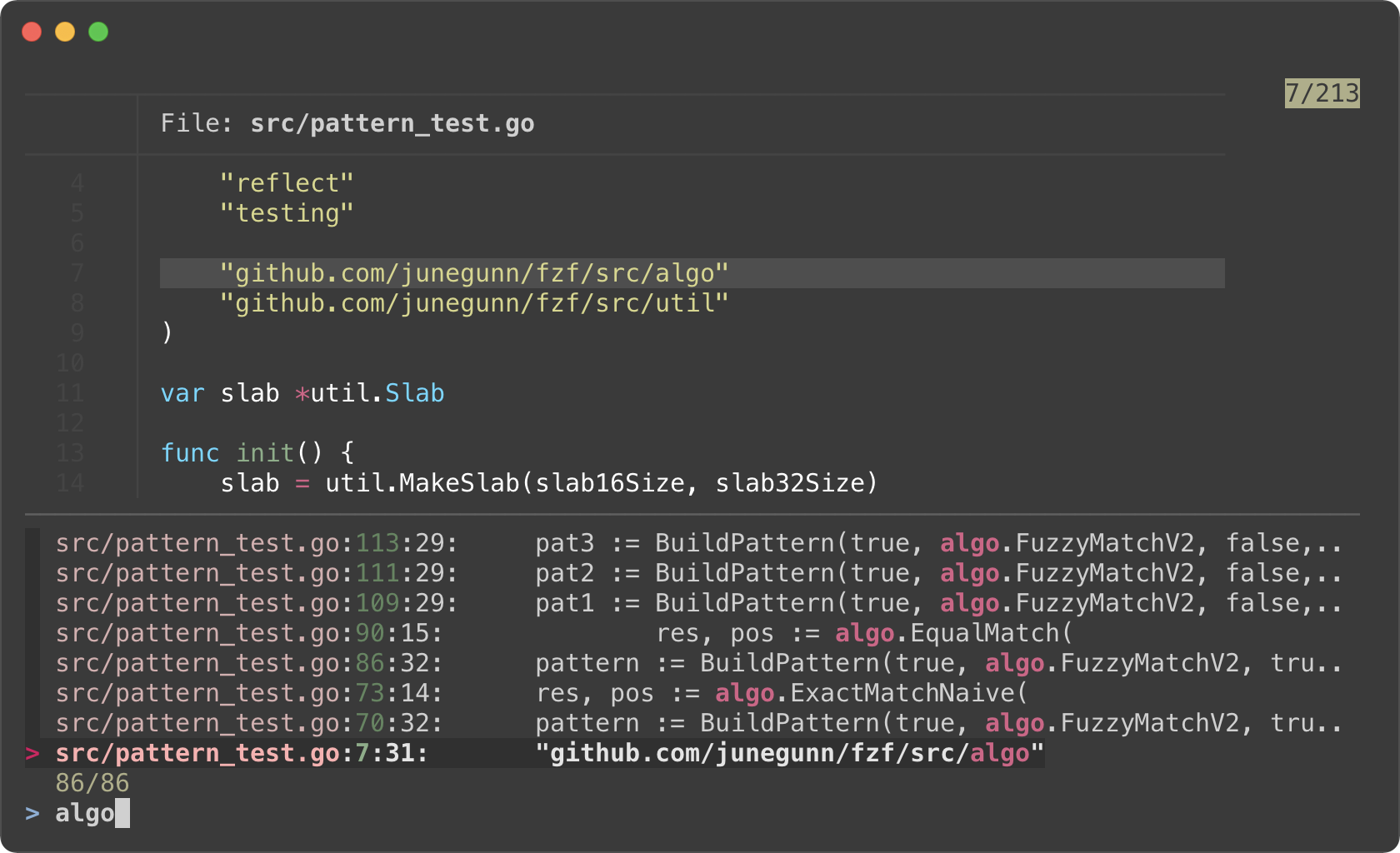350 9 unmodified lines360 a query.361 362 ### Switching to fzf-only search mode363 361-*(Requires fzf 0.27.1 or above)*362-364 In the previous example, we lost fuzzy matching capability as we completely365 delegated search functionality to Ripgrep. But we can dynamically switch to366 fzf-only search mode by *"unbinding"* `reload` action from `change` event.367 7 unmodified lines375 # * Press alt-enter to switch to fzf-only filtering376 # 3. Open the file in Vim377 RG_PREFIX="rg --column --line-number --no-heading --color=always --smart-case "378 INITIAL_QUERY="${*:-}"378-IFS=: read -ra selected < <(379- FZF_DEFAULT_COMMAND="$RG_PREFIX $(printf %q "$INITIAL_QUERY")" \380- fzf --ansi \381- --color "hl:-1:underline,hl+:-1:underline:reverse" \382- --disabled --query "$INITIAL_QUERY" \383- --bind "change:reload:sleep 0.1; $RG_PREFIX {q} || true" \384- --bind "alt-enter:unbind(change,alt-enter)+change-prompt(2. fzf> )+enable-search+clear-query" \385- --prompt '1. ripgrep> ' \386- --delimiter : \387- --preview 'bat --color=always {1} --highlight-line {2}' \388- --preview-window 'up,60%,border-bottom,+{2}+3/3,~3'389-)379+FZF_DEFAULT_COMMAND="$RG_PREFIX $(printf %q "$INITIAL_QUERY")" \380+fzf --ansi \381+ --color "hl:-1:underline,hl+:-1:underline:reverse" \382+ --disabled --query "$INITIAL_QUERY" \383+ --bind "change:reload:sleep 0.1; $RG_PREFIX {q} || true" \384+ --bind "alt-enter:unbind(change,alt-enter)+change-prompt(2. fzf> )+enable-search+clear-query" \385+ --prompt '1. ripgrep> ' \386+ --delimiter : \387+ --preview 'bat --color=always {1} --highlight-line {2}' \388+ --preview-window 'up,60%,border-bottom,+{2}+3/3,~3' \389+ --bind 'enter:become(vim {1} +{2})'390-[ -n "${selected[0]}" ] && vim "${selected[0]}" "+${selected[1]}"390 ```391 392 * Phase 1. Filtering with Ripgrep393 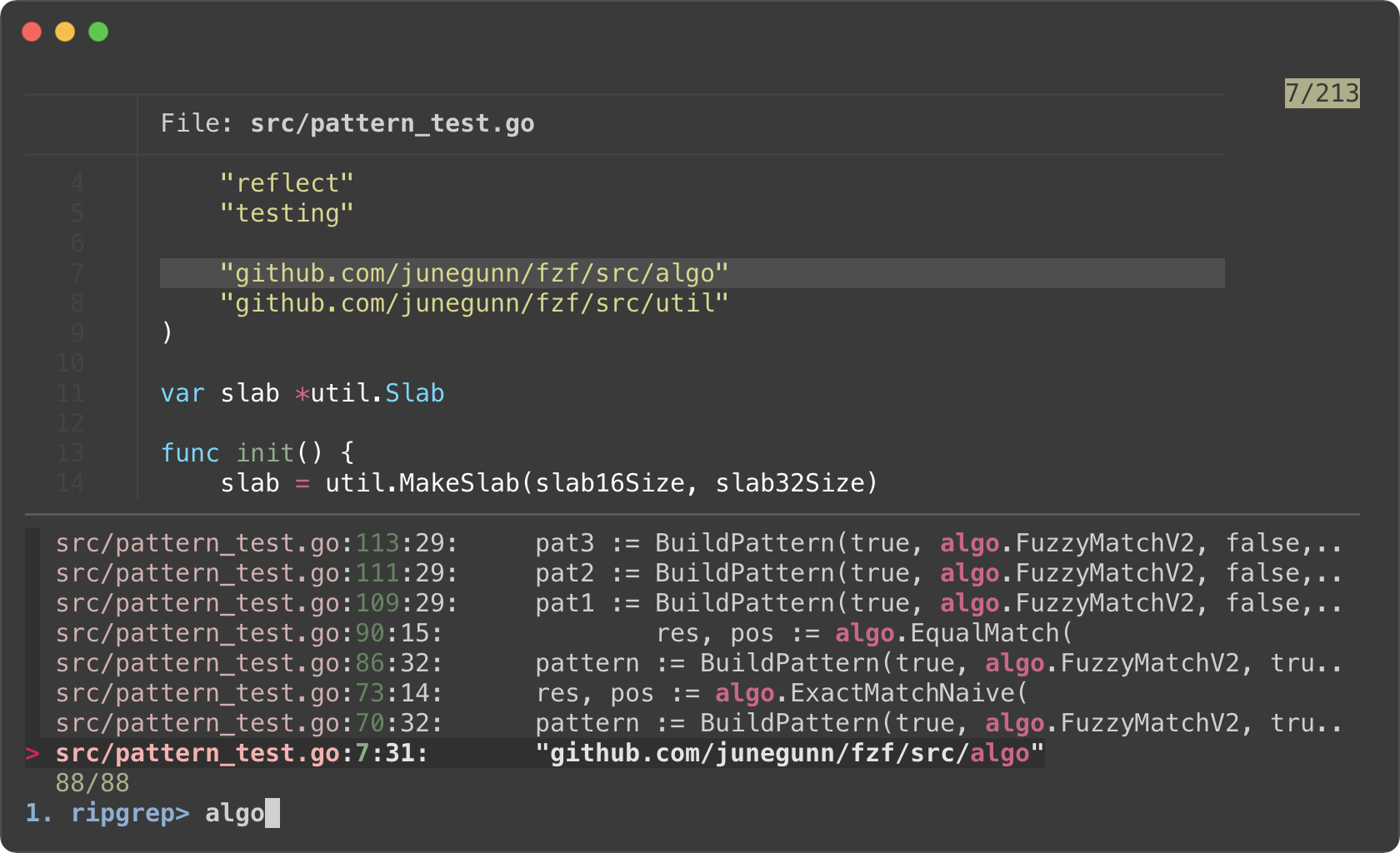12 unmodified lines406 displayed in the second phase407 408 ### Switching between Ripgrep mode and fzf mode409 411-*(Requires fzf 0.36.0 or above)*412-410 [fzf 0.30.0][0.30.0] added `rebind` action so we can "rebind" the bindings411 that were previously "unbound" via `unbind`.412 413 This is an improved version of the previous example that allows us to switch6 unmodified lines420 # Switch between Ripgrep launcher mode (CTRL-R) and fzf filtering mode (CTRL-F)421 rm -f /tmp/rg-fzf-{r,f}422 RG_PREFIX="rg --column --line-number --no-heading --color=always --smart-case "423 INITIAL_QUERY="${*:-}"427-IFS=: read -ra selected < <(428- FZF_DEFAULT_COMMAND="$RG_PREFIX $(printf %q "$INITIAL_QUERY")" \429- fzf --ansi \430- --color "hl:-1:underline,hl+:-1:underline:reverse" \431- --disabled --query "$INITIAL_QUERY" \432- --bind "change:reload:sleep 0.1; $RG_PREFIX {q} || true" \433- --bind "ctrl-f:unbind(change,ctrl-f)+change-prompt(2. fzf> )+enable-search+rebind(ctrl-r)+transform-query(echo {q} > /tmp/rg-fzf-r; cat /tmp/rg-fzf-f)" \434- --bind "ctrl-r:unbind(ctrl-r)+change-prompt(1. ripgrep> )+disable-search+reload($RG_PREFIX {q} || true)+rebind(change,ctrl-f)+transform-query(echo {q} > /tmp/rg-fzf-f; cat /tmp/rg-fzf-r)" \435- --bind "start:unbind(ctrl-r)" \436- --prompt '1. ripgrep> ' \437- --delimiter : \438- --header '╱ CTRL-R (ripgrep mode) ╱ CTRL-F (fzf mode) ╱' \439- --preview 'bat --color=always {1} --highlight-line {2}' \440- --preview-window 'up,60%,border-bottom,+{2}+3/3,~3'441-)424+FZF_DEFAULT_COMMAND="$RG_PREFIX $(printf %q "$INITIAL_QUERY")" \425+fzf --ansi \426+ --color "hl:-1:underline,hl+:-1:underline:reverse" \427+ --disabled --query "$INITIAL_QUERY" \428+ --bind "change:reload:sleep 0.1; $RG_PREFIX {q} || true" \429+ --bind "ctrl-f:unbind(change,ctrl-f)+change-prompt(2. fzf> )+enable-search+rebind(ctrl-r)+transform-query(echo {q} > /tmp/rg-fzf-r; cat /tmp/rg-fzf-f)" \430+ --bind "ctrl-r:unbind(ctrl-r)+change-prompt(1. ripgrep> )+disable-search+reload($RG_PREFIX {q} || true)+rebind(change,ctrl-f)+transform-query(echo {q} > /tmp/rg-fzf-f; cat /tmp/rg-fzf-r)" \431+ --bind "start:unbind(ctrl-r)" \432+ --prompt '1. ripgrep> ' \433+ --delimiter : \434+ --header '╱ CTRL-R (ripgrep mode) ╱ CTRL-F (fzf mode) ╱' \435+ --preview 'bat --color=always {1} --highlight-line {2}' \436+ --preview-window 'up,60%,border-bottom,+{2}+3/3,~3' \437+ --bind 'enter:become(vim {1} +{2})'442-[ -n "${selected[0]}" ] && vim "${selected[0]}" "+${selected[1]}"438 ```439 440 - To restore the query string when switching between modes, we store the441 current query in `/tmp/rg-fzf-{r,f}` files and restore the query using174 unmodified linesmodified:CHANGELOG.md+5 added-5 removed
3 unmodified lines4 0.38.05 ------6 - New actions7 - `become(...)` - Replace the current fzf process with the specified8- command using `execve(2)` system call. This action enables a simpler9- alternative to using `--expect` and checking the output in the wrapping10- script.8+ command using `execve(2)` system call.9+ See https://github.com/junegunn/fzf#turning-into-a-different-process.10 ```sh12- # Open selected files in different editors13- fzf --multi --bind 'enter:become($EDITOR {+}),ctrl-n:become(nano {+})'11+ # Open the file in Vim and go to the line12+ git grep --line-number . |13+ fzf --delimiter : --nth 3.. --bind 'enter:become(vim {1} +{2})'14 ```15 - This action is not supported on Windows16 - `show-preview`17 - `hide-preview`1543 unmodified linesmodified:README.md+58 added
52 unmodified lines53 * [Vim plugin](#vim-plugin)54 * [Advanced topics](#advanced-topics)55 * [Performance](#performance)56 * [Executing external programs](#executing-external-programs)57+ * [Turning into a different process](#turning-into-a-different-process)58 * [Reloading the candidate list](#reloading-the-candidate-list)59 * [1. Update the list of processes by pressing CTRL-R](#1-update-the-list-of-processes-by-pressing-ctrl-r)60 * [2. Switch between sources by pressing CTRL-D or CTRL-F](#2-switch-between-sources-by-pressing-ctrl-d-or-ctrl-f)61 * [3. Interactive ripgrep integration](#3-interactive-ripgrep-integration)142 unmodified lines204 ```sh205 vim $(fzf)206 ```207 208+> *:bulb: A more robust solution would be to use `xargs` but we've presented209+> the above as it's easier to grasp*210+> ```sh211+> fzf --print0 | xargs -0 -o vim212+> ```213+214+>215+> *:bulb: fzf also has the ability to turn itself into a different process.*216+>217+> ```sh218+> fzf --bind 'enter:become(vim {})'219+> ```220+>221+> *See [Turning into a different process](#turning-into-a-different-process)222+> for more information.*223+224 ### Using the finder225 226 - `CTRL-K` / `CTRL-J` (or `CTRL-P` / `CTRL-N`) to move cursor up and down227 - `Enter` key to select the item, `CTRL-C` / `CTRL-G` / `ESC` to exit350 unmodified lines578 ```579 580 See *KEY BINDINGS* section of the man page for details.581 582+### Turning into a different process583+584+`become(...)` is similar to `execute(...)`/`execute-silent(...)` described585+above, but instead of executing the command and coming back to fzf on586+complete, it turns fzf into a new process for the command.587+588+```sh589+fzf --bind 'enter:become(vim {})'590+```591+592+Compared to the seemingly equivalent command substitution `vim "$(fzf)"`, this593+approach has several advantages:594+595+* Vim will not open an empty file when you terminate fzf with596+ <kbd>CTRL-C</kbd>597+* Vim will not open an empty file when you press <kbd>ENTER</kbd> on an empty598+ result599+* Can handle multiple selections even when they have whitespaces600+ ```sh601+ fzf --multi --bind 'enter:become(vim {+})'602+ ```603+604+To be fair, running `fzf --print0 | xargs -0 -o vim` instead of `vim "$(fzf)"`605+resolves all of the issues mentioned. Nonetheless, `become(...)` still offers606+additional benefits in different scenarios.607+608+* You can set up multiple bindings to handle the result in different ways609+ without any wrapping script610+ ```sh611+ fzf --bind 'enter:become(vim {}),ctrl-e:become(emacs {})'612+ ```613+ * Previously, you would have to use `--expect=ctrl-e` and check the first614+ line of the output of fzf615+* You can easily build the subsequent command using the field index616+ expressions of fzf617+ ```sh618+ # Open the file in Vim and go to the line619+ git grep --line-number . |620+ fzf --delimiter : --nth 3.. --bind 'enter:become(vim {1} +{2})'621+ ```622+623 ### Reloading the candidate list624 625 By binding `reload` action to a key or an event, you can make fzf dynamically626 reload the candidate list. See https://github.com/junegunn/fzf/issues/1750 for159 unmodified lines