codeberg.org/dnkl/fuzzel
- Folder:.builds
- Folder:.forgejo
- Folder:3rd-party
- Folder:completions
- Folder:doc
- Folder:external
- Folder:nanosvg
- Folder:subprojects
- Folder:test
- File:.editorconfig
- File:.gitignore
- File:.gitmodules
- File:.woodpecker.yaml
- File:CHANGELOG.md
- File:CONTRIBUTING.md
- File:LICENSE
- File:PKGBUILD
- File:README.md
- File:application.c
- File:application.h
- File:char32.c
- File:char32.h
- File:clipboard.c
- File:clipboard.h
- File:column.c
- File:column.h
- File:config.c
- File:config.h
- File:debug.c
- File:debug.h
- File:dmenu.c
- File:dmenu.h
- File:event.c
- File:event.h
- File:fdm.c
- File:fdm.h
- File:fuzzel.ini
- File:generate-version.sh
- File:icon.c
- File:icon.h
- File:key-binding.c
- File:key-binding.h
- File:log.c
- File:log.h
- File:macros.h
- File:main.c
- File:match.c
- File:match.h
- File:meson.build
- File:meson_options.txt
- File:nanosvg.c
- File:nanosvgrast.c
- File:path.c
- File:path.h
- File:png-fuzzel.h
- File:png.c
- File:prompt.c
- File:prompt.h
- File:render.c
- File:render.h
- File:shm.c
- File:shm.h
- File:srgb.py
- File:stride.h
- File:timing.c
- File:timing.h
- File:uri.c
- File:uri.h
- File:wayland.c
- File:wayland.h
- File:xdg.c
- File:xdg.h
- File:xmalloc.c
- File:xmalloc.h
- File:xsnprintf.c
- File:xsnprintf.h
README.md

Fuzzel
Fuzzel is a Wayland-native application launcher and fuzzy finder, inspired by rofi and dmenu.

Screenshot
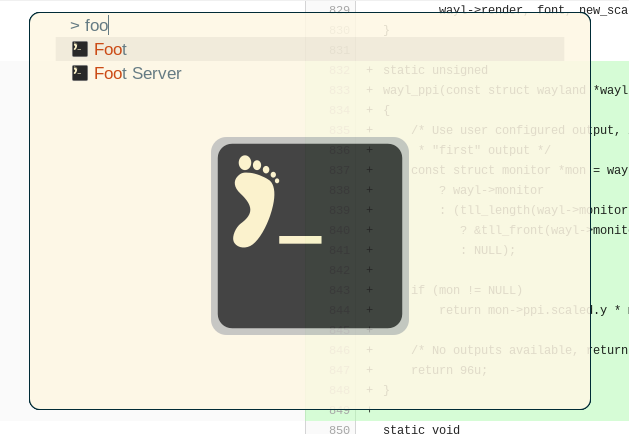
Fuzzel, with transparency, on top of a browser window showing a diff of a fuzzel commit
Features
For app launching
- Fuzzy-find applications from a list and launch them
- Icon support
- Remembers frequently launched applications
- Customize which
.desktopfiles are searched - Option to filter apps based on
OnlyShowInandNotShowIn - Startup notification support
- Launch prefix option to customize how apps are launched
- Display a large icon of current selection if there are only a few matches
- Option to display executables in $PATH
- Option to execute the input rather than return an app
- Support for localized strings
For dmenu mode
- dmenu mode where newline separated entries are read from STDIN
- Support for Rofi's protocol to support icons
- Optional cache with custom path
- Password mode
- Prompt-only mode
- Exact-match option to support multi-stage menus
- Option to return index of what's selected rather than what's selected
- Some dmenu option compatibility. Invoking it as
dmenuenables dmenu mode - Option for null-separated input
For all modes
- Numerous customizable key bindings, based on Emacs
- Mouse & touchscreen support
- Paste support
- Emoji support
- A number of theming options, which can be set in a separate
includefile - fzf-style matching with ability to filter huge lists
- Optimized for performance
- Zsh and Fish completions
- Support for true fractional scaling
- Wayland native
- IME support via the text-input-unstable-v3 protocol
For details, see man fuzzel
Requirements
Runtime
- pixman
- wayland (client and cursor libraries)
- xkbcommon
- cairo (optional, required by librsvg)
- libpng (optional)
- librsvg (optional, for enhanced SVG icon support)
- fcft 1
Fuzzel uses the builtin nanosvg backend to render SVG icons by default. Since nanosvg is somewhat limited, we also offer a librsvg backend for SVG icons. Note that librsvg also requires cairo.
Building
Installation
To build, first, create a build directory, and switch to it:
mkdir -p bld/release && cd bld/release
Second, configure the build (if you intend to install it globally, you
might also want --prefix=/usr):
meson --buildtype=release \
    -Denable-cairo=disabled|enabled|auto \
    -Dpng-backend=none|libpng \
    -Dsvg-backend=none|librsvg|nanosvg \
    ../..
-D{png,svg}-backend can be used to force-enable or force-disable a
specific png and/or svg backend. Note that nanosvg is builtin
(i.e. it needs to external dependencies).
-Denable-cairo can be used to force-enable or force-disable cairo support.
When disabled, fuzzel will not support SVGs using the librsvg backend.
Three, build it:
ninja
You can now run it directly from the build directory:
./fuzzel
Use command line arguments to configure the look-and-feel:
./fuzzel --help
Optionally, install it:
ninja install
For more detailed configuration information, see the man pages:
man fuzzel
man fuzzel.ini
Testing
Fuzzel has some automated tests in test/. To run them, Fish shell and wtype are required.
The test runner can be installed within Fish shell with:
fisher install jorgebucaran/fishtape
Once installed, the tests can be run with:
fishtape test/*.fish
No AI / LLM policy
Use of generative AI/LLMs is strictly forbidden for all contributions to fuzzel.
This includes bug reports and comments on the issue and pull request trackers.
License
Fuzzel is released under the MIT license.
Fuzzel uses nanosvg, released under the Zlib license.
Sponsoring/donations
- Liberapay: https://liberapay.com/dnkl
- GitHub Sponsors: https://github.com/sponsors/dnkl
