README.md
This file
Path
README.md
541 lines · 21.1 KiB · Markdown
Last changed by
msrv: bump to Rust 1.96Andrew Gallantbefore adoptionc035d23
History of this fileTake it
The walk stopped after 200 commits: lines older than 5f5da48 point at it.
globset: support nested alternatesLuke Sandbergbefore adoption5f5da48
lines 1–74why, one step back1ripgrep (rg)2------------3ripgrep is a line-oriented search tool that recursively searches the current4directory for a regex pattern. By default, ripgrep will respect gitignore rules5and automatically skip hidden files/directories and binary files. (To disable6all automatic filtering by default, use `rg -uuu`.) ripgrep has first class7support on Windows, macOS and Linux, with binary downloads available for [every8release](https://github.com/BurntSushi/ripgrep/releases). ripgrep is similar to9other popular search tools like The Silver Searcher, ack and grep.1011[](https://github.com/BurntSushi/ripgrep/actions)12[](https://crates.io/crates/ripgrep)13[](https://repology.org/project/ripgrep/badges)1415Dual-licensed under MIT or the [UNLICENSE](https://unlicense.org).161718### CHANGELOG1920Please see the [CHANGELOG](CHANGELOG.md) for a release history.2122### Documentation quick links2324* [Installation](#installation)25* [User Guide](GUIDE.md)26* [Frequently Asked Questions](FAQ.md)27* [Regex syntax](https://docs.rs/regex/1/regex/#syntax)28* [Configuration files](GUIDE.md#configuration-file)29* [Shell completions](FAQ.md#complete)30* [Building](#building)31* [Translations](#translations)323334### Screenshot of search results3536[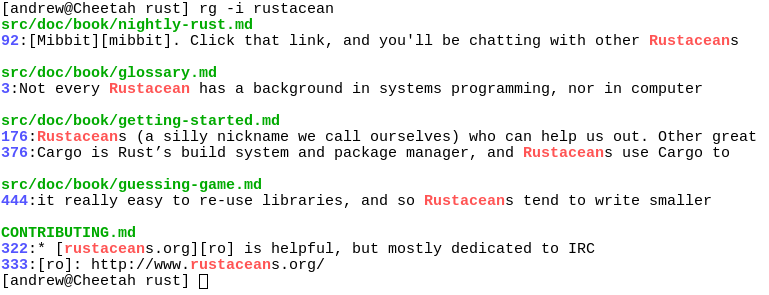](https://burntsushi.net/stuff/ripgrep1.png)373839### Quick examples comparing tools4041This example searches the entire42[Linux kernel source tree](https://github.com/BurntSushi/linux)43(after running `make defconfig && make -j8`) for `[A-Z]+_SUSPEND`, where44all matches must be words. Timings were collected on a system with an Intel45i9-12900K 5.2 GHz.4647Please remember that a single benchmark is never enough! See my48[blog post on ripgrep](https://blog.burntsushi.net/ripgrep/)49for a very detailed comparison with more benchmarks and analysis.5051| Tool | Command | Line count | Time |52| ---- | ------- | ---------- | ---- |53| ripgrep (Unicode) | `rg -n -w '[A-Z]+_SUSPEND'` | 536 | **0.082s** (1.00x) |54| [hypergrep](https://github.com/p-ranav/hypergrep) | `hgrep -n -w '[A-Z]+_SUSPEND'` | 536 | 0.167s (2.04x) |55| [git grep](https://www.kernel.org/pub/software/scm/git/docs/git-grep.html) | `git grep -P -n -w '[A-Z]+_SUSPEND'` | 536 | 0.273s (3.34x) |56| [The Silver Searcher](https://github.com/ggreer/the_silver_searcher) | `ag -w '[A-Z]+_SUSPEND'` | 534 | 0.443s (5.43x) |57| [ugrep](https://github.com/Genivia/ugrep) | `ugrep -r --ignore-files --no-hidden -I -w '[A-Z]+_SUSPEND'` | 536 | 0.639s (7.82x) |58| [git grep](https://www.kernel.org/pub/software/scm/git/docs/git-grep.html) | `LC_ALL=C git grep -E -n -w '[A-Z]+_SUSPEND'` | 536 | 0.727s (8.91x) |59| [git grep (Unicode)](https://www.kernel.org/pub/software/scm/git/docs/git-grep.html) | `LC_ALL=en_US.UTF-8 git grep -E -n -w '[A-Z]+_SUSPEND'` | 536 | 2.670s (32.70x) |60| [ack](https://github.com/beyondgrep/ack3) | `ack -w '[A-Z]+_SUSPEND'` | 2677 | 2.935s (35.94x) |6162Here's another benchmark on the same corpus as above that disregards gitignore63files and searches with a whitelist instead. The corpus is the same as in the64previous benchmark, and the flags passed to each command ensure that they are65doing equivalent work:6667| Tool | Command | Line count | Time |68| ---- | ------- | ---------- | ---- |69| ripgrep | `rg -uuu -tc -n -w '[A-Z]+_SUSPEND'` | 447 | **0.063s** (1.00x) |70| [ugrep](https://github.com/Genivia/ugrep) | `ugrep -r -n --include='*.c' --include='*.h' -w '[A-Z]+_SUSPEND'` | 447 | 0.607s (9.62x) |71| [GNU grep](https://www.gnu.org/software/grep/) | `grep -E -r -n --include='*.c' --include='*.h' -w '[A-Z]+_SUSPEND'` | 447 | 0.674s (10.69x) |7273Now we'll move to searching on single large file. Here is a straight-up74comparison between ripgrep, ugrep and GNU grep on a file cached in memorydoc: update OpenSubtitles benchmark corpus URL in READMEAlex Chenbefore adoptionfc3dd04
line 75why, one step back75(~13GB, [`OpenSubtitles.raw.en.gz`](https://object.pouta.csc.fi/OPUS-OpenSubtitles/v2018/mono/en.txt.gz), decompressed):globset: support nested alternatesLuke Sandbergbefore adoption5f5da48
lines 76–304why, one step back7677| Tool | Command | Line count | Time |78| ---- | ------- | ---------- | ---- |79| ripgrep (Unicode) | `rg -w 'Sherlock [A-Z]\w+'` | 7882 | **1.042s** (1.00x) |80| [ugrep](https://github.com/Genivia/ugrep) | `ugrep -w 'Sherlock [A-Z]\w+'` | 7882 | 1.339s (1.28x) |81| [GNU grep (Unicode)](https://www.gnu.org/software/grep/) | `LC_ALL=en_US.UTF-8 egrep -w 'Sherlock [A-Z]\w+'` | 7882 | 6.577s (6.31x) |8283In the above benchmark, passing the `-n` flag (for showing line numbers)84increases the times to `1.664s` for ripgrep and `9.484s` for GNU grep. ugrep85times are unaffected by the presence or absence of `-n`.8687Beware of performance cliffs though:8889| Tool | Command | Line count | Time |90| ---- | ------- | ---------- | ---- |91| ripgrep (Unicode) | `rg -w '[A-Z]\w+ Sherlock [A-Z]\w+'` | 485 | **1.053s** (1.00x) |92| [GNU grep (Unicode)](https://www.gnu.org/software/grep/) | `LC_ALL=en_US.UTF-8 grep -E -w '[A-Z]\w+ Sherlock [A-Z]\w+'` | 485 | 6.234s (5.92x) |93| [ugrep](https://github.com/Genivia/ugrep) | `ugrep -w '[A-Z]\w+ Sherlock [A-Z]\w+'` | 485 | 28.973s (27.51x) |9495And performance can drop precipitously across the board when searching big96files for patterns without any opportunities for literal optimizations:9798| Tool | Command | Line count | Time |99| ---- | ------- | ---------- | ---- |100| ripgrep | `rg '[A-Za-z]{30}'` | 6749 | **15.569s** (1.00x) |101| [ugrep](https://github.com/Genivia/ugrep) | `ugrep -E '[A-Za-z]{30}'` | 6749 | 21.857s (1.40x) |102| [GNU grep](https://www.gnu.org/software/grep/) | `LC_ALL=C grep -E '[A-Za-z]{30}'` | 6749 | 32.409s (2.08x) |103| [GNU grep (Unicode)](https://www.gnu.org/software/grep/) | `LC_ALL=en_US.UTF-8 grep -E '[A-Za-z]{30}'` | 6795 | 8m30s (32.74x) |104105Finally, high match counts also tend to both tank performance and smooth106out the differences between tools (because performance is dominated by how107quickly one can handle a match and not the algorithm used to detect the match,108generally speaking):109110| Tool | Command | Line count | Time |111| ---- | ------- | ---------- | ---- |112| ripgrep | `rg the` | 83499915 | **6.948s** (1.00x) |113| [ugrep](https://github.com/Genivia/ugrep) | `ugrep the` | 83499915 | 11.721s (1.69x) |114| [GNU grep](https://www.gnu.org/software/grep/) | `LC_ALL=C grep the` | 83499915 | 15.217s (2.19x) |115116### Why should I use ripgrep?117118* It can replace many use cases served by other search tools119 because it contains most of their features and is generally faster. (See120 [the FAQ](FAQ.md#posix4ever) for more details on whether ripgrep can truly121 replace grep.)122* Like other tools specialized to code search, ripgrep defaults to123 [recursive search](GUIDE.md#recursive-search) and does [automatic124 filtering](GUIDE.md#automatic-filtering). Namely, ripgrep won't search files125 ignored by your `.gitignore`/`.ignore`/`.rgignore` files, it won't search126 hidden files and it won't search binary files. Automatic filtering can be127 disabled with `rg -uuu`.128* ripgrep can [search specific types of files](GUIDE.md#manual-filtering-file-types).129 For example, `rg -tpy foo` limits your search to Python files and `rg -Tjs130 foo` excludes JavaScript files from your search. ripgrep can be taught about131 new file types with custom matching rules.132* ripgrep supports many features found in `grep`, such as showing the context133 of search results, searching multiple patterns, highlighting matches with134 color and full Unicode support. Unlike GNU grep, ripgrep stays fast while135 supporting Unicode (which is always on).136* ripgrep has optional support for switching its regex engine to use PCRE2.137 Among other things, this makes it possible to use look-around and138 backreferences in your patterns, which are not supported in ripgrep's default139 regex engine. PCRE2 support can be enabled with `-P/--pcre2` (use PCRE2140 always) or `--auto-hybrid-regex` (use PCRE2 only if needed). An alternative141 syntax is provided via the `--engine (default|pcre2|auto)` option.142* ripgrep has [rudimentary support for replacements](GUIDE.md#replacements),143 which permit rewriting output based on what was matched.144* ripgrep supports [searching files in text encodings](GUIDE.md#file-encoding)145 other than UTF-8, such as UTF-16, latin-1, GBK, EUC-JP, Shift_JIS and more.146 (Some support for automatically detecting UTF-16 is provided. Other text147 encodings must be specifically specified with the `-E/--encoding` flag.)148* ripgrep supports searching files compressed in a common format (brotli,149 bzip2, gzip, lz4, lzma, xz, or zstandard) with the `-z/--search-zip` flag.150* ripgrep supports151 [arbitrary input preprocessing filters](GUIDE.md#preprocessor)152 which could be PDF text extraction, less supported decompression, decrypting,153 automatic encoding detection and so on.154* ripgrep can be configured via a155 [configuration file](GUIDE.md#configuration-file).156157In other words, use ripgrep if you like speed, filtering by default, fewer158bugs and Unicode support.159160161### Why shouldn't I use ripgrep?162163Despite initially not wanting to add every feature under the sun to ripgrep,164over time, ripgrep has grown support for most features found in other file165searching tools. This includes searching for results spanning across multiple166lines, and opt-in support for PCRE2, which provides look-around and167backreference support.168169At this point, the primary reasons not to use ripgrep probably consist of one170or more of the following:171172* You need a portable and ubiquitous tool. While ripgrep works on Windows,173 macOS and Linux, it is not ubiquitous and it does not conform to any174 standard such as POSIX. The best tool for this job is good old grep.175* There still exists some other feature (or bug) not listed in this README that176 you rely on that's in another tool that isn't in ripgrep.177* There is a performance edge case where ripgrep doesn't do well where another178 tool does do well. (Please file a bug report!)179* ripgrep isn't possible to install on your machine or isn't available for your180 platform. (Please file a bug report!)181182183### Is it really faster than everything else?184185Generally, yes. A large number of benchmarks with detailed analysis for each is186[available on my blog](https://blog.burntsushi.net/ripgrep/).187188Summarizing, ripgrep is fast because:189190* It is built on top of191 [Rust's regex engine](https://github.com/rust-lang/regex).192 Rust's regex engine uses finite automata, SIMD and aggressive literal193 optimizations to make searching very fast. (PCRE2 support can be opted into194 with the `-P/--pcre2` flag.)195* Rust's regex library maintains performance with full Unicode support by196 building UTF-8 decoding directly into its deterministic finite automaton197 engine.198* It supports searching with either memory maps or by searching incrementally199 with an intermediate buffer. The former is better for single files and the200 latter is better for large directories. ripgrep chooses the best searching201 strategy for you automatically.202* Applies your ignore patterns in `.gitignore` files using a203 [`RegexSet`](https://docs.rs/regex/1/regex/struct.RegexSet.html).204 That means a single file path can be matched against multiple glob patterns205 simultaneously.206* It uses a lock-free parallel recursive directory iterator, courtesy of207 [`crossbeam`](https://docs.rs/crossbeam) and208 [`ignore`](https://docs.rs/ignore).209210211### Feature comparison212213Andy Lester, author of [ack](https://beyondgrep.com/), has published an214excellent table comparing the features of ack, ag, git-grep, GNU grep and215ripgrep: https://beyondgrep.com/feature-comparison/216217Note that ripgrep has grown a few significant new features recently that218are not yet present in Andy's table. This includes, but is not limited to,219configuration files, passthru, support for searching compressed files,220multiline search and opt-in fancy regex support via PCRE2.221222223### Playground224225If you'd like to try ripgrep before installing, there's an unofficial226[playground](https://codapi.org/ripgrep/) and an [interactive227tutorial](https://codapi.org/try/ripgrep/).228229If you have any questions about these, please open an issue in the [tutorial230repo](https://github.com/nalgeon/tryxinyminutes).231232233### Installation234235The binary name for ripgrep is `rg`.236237**[Archives of precompiled binaries for ripgrep are available for Windows,238macOS and Linux.](https://github.com/BurntSushi/ripgrep/releases)** Linux and239Windows binaries are static executables. Users of platforms not explicitly240mentioned below are advised to download one of these archives.241242If you're a **macOS Homebrew** or a **Linuxbrew** user, then you can install243ripgrep from homebrew-core:244245```246$ brew install ripgrep247```248249If you're a **MacPorts** user, then you can install ripgrep from the250[official ports](https://www.macports.org/ports.php?by=name&substr=ripgrep):251252```253$ sudo port install ripgrep254```255256If you're a **Windows Chocolatey** user, then you can install ripgrep from the257[official repo](https://chocolatey.org/packages/ripgrep):258259```260$ choco install ripgrep261```262263If you're a **Windows Scoop** user, then you can install ripgrep from the264[official bucket](https://github.com/ScoopInstaller/Main/blob/master/bucket/ripgrep.json):265266```267$ scoop install ripgrep268```269270If you're a **Windows Winget** user, then you can install ripgrep from the271[winget-pkgs](https://github.com/microsoft/winget-pkgs/tree/master/manifests/b/BurntSushi/ripgrep)272repository:273274```275$ winget install BurntSushi.ripgrep.MSVC276```277278If you're an **Arch Linux** user, then you can install ripgrep from the official repos:279280```281$ sudo pacman -S ripgrep282```283284If you're a **Gentoo** user, you can install ripgrep from the285[official repo](https://packages.gentoo.org/packages/sys-apps/ripgrep):286287```288$ sudo emerge sys-apps/ripgrep289```290291If you're a **Fedora** user, you can install ripgrep from official292repositories.293294```295$ sudo dnf install ripgrep296```297298If you're an **openSUSE** user, ripgrep is included in **openSUSE Tumbleweed**299and **openSUSE Leap** since 15.1.300301```302$ sudo zypper install ripgrep303```304doc: update the CentOS, RHEL and Rocky Linux installation instructionsAndrew Gallantbefore adoption9802945
lines 305–306why, one step back305If you're a **CentOS Stream 10** user, you can install ripgrep from the306[EPEL](https://docs.fedoraproject.org/en-US/epel/getting-started/) repository:doc: update installation instructions for RHEL/CentOS/Rocky Linux 9wackgetbefore adoptionc037310
lines 307–309why, one step back307308```309$ sudo dnf config-manager --set-enabled crbdoc: update the CentOS, RHEL and Rocky Linux installation instructionsAndrew Gallantbefore adoption9802945
lines 310–328why, one step back310$ sudo dnf install https://dl.fedoraproject.org/pub/epel/epel-release-latest-10.noarch.rpm311$ sudo dnf install ripgrep312```313314If you're a **Red Hat 10** user, you can install ripgrep from the315[EPEL](https://docs.fedoraproject.org/en-US/epel/getting-started/) repository:316317```318$ sudo subscription-manager repos --enable codeready-builder-for-rhel-10-$(arch)-rpms319$ sudo dnf install https://dl.fedoraproject.org/pub/epel/epel-release-latest-10.noarch.rpm320$ sudo dnf install ripgrep321```322323If you're a **Rocky Linux 10** user, you can install ripgrep from the324[EPEL](https://docs.fedoraproject.org/en-US/epel/getting-started/) repository:325326```327$ sudo dnf install https://dl.fedoraproject.org/pub/epel/epel-release-latest-10.noarch.rpm328$ sudo dnf install ripgrepdoc: update installation instructions for RHEL/CentOS/Rocky Linux 9wackgetbefore adoptionc037310
lines 329–330why, one step back329```330globset: support nested alternatesLuke Sandbergbefore adoption5f5da48
line 331why, one step back331If you're a **Nix** user, you can install ripgrep fromdoc: fix nixpkgs linkNadir Ishigurobefore adoption28cce89
line 332why, one step back332[nixpkgs](https://github.com/NixOS/nixpkgs/blob/master/pkgs/by-name/ri/ripgrep/package.nix):globset: support nested alternatesLuke Sandbergbefore adoption5f5da48
lines 333–355why, one step back333334```335$ nix-env --install ripgrep336```337338If you're a **Flox** user, you can install ripgrep as follows:339340```341$ flox install ripgrep342```343344If you're a **Guix** user, you can install ripgrep from the official345package collection:346347```348$ guix install ripgrep349```350351If you're a **Debian** user (or a user of a Debian derivative like **Ubuntu**),352then ripgrep can be installed using a binary `.deb` file provided in each353[ripgrep release](https://github.com/BurntSushi/ripgrep/releases).354355```doc: actually fix deb download linkAndrew Gallantbefore adoptionfdfda9a
line 356why, one step back356$ curl -LO https://github.com/BurntSushi/ripgrep/releases/download/14.1.1/ripgrep_14.1.1-1_amd64.debglobset: support nested alternatesLuke Sandbergbefore adoption5f5da48
lines 357–431why, one step back357$ sudo dpkg -i ripgrep_14.1.1-1_amd64.deb358```359360If you run Debian stable, ripgrep is [officially maintained by361Debian](https://tracker.debian.org/pkg/rust-ripgrep), although its version may362be older than the `deb` package available in the previous step.363364```365$ sudo apt-get install ripgrep366```367368If you're an **Ubuntu Cosmic (18.10)** (or newer) user, ripgrep is369[available](https://launchpad.net/ubuntu/+source/rust-ripgrep) using the same370packaging as Debian:371372```373$ sudo apt-get install ripgrep374```375376(N.B. Various snaps for ripgrep on Ubuntu are also available, but none of them377seem to work right and generate a number of very strange bug reports that I378don't know how to fix and don't have the time to fix. Therefore, it is no379longer a recommended installation option.)380381If you're an **ALT** user, you can install ripgrep from the382[official repo](https://packages.altlinux.org/en/search?name=ripgrep):383384```385$ sudo apt-get install ripgrep386```387388If you're a **FreeBSD** user, then you can install ripgrep from the389[official ports](https://www.freshports.org/textproc/ripgrep/):390391```392$ sudo pkg install ripgrep393```394395If you're an **OpenBSD** user, then you can install ripgrep from the396[official ports](https://openports.se/textproc/ripgrep):397398```399$ doas pkg_add ripgrep400```401402If you're a **NetBSD** user, then you can install ripgrep from403[pkgsrc](https://pkgsrc.se/textproc/ripgrep):404405```406$ sudo pkgin install ripgrep407```408409If you're a **Haiku x86_64** user, then you can install ripgrep from the410[official ports](https://github.com/haikuports/haikuports/tree/master/sys-apps/ripgrep):411412```413$ sudo pkgman install ripgrep414```415416If you're a **Haiku x86_gcc2** user, then you can install ripgrep from the417same port as Haiku x86_64 using the x86 secondary architecture build:418419```420$ sudo pkgman install ripgrep_x86421```422423If you're a **Void Linux** user, then you can install ripgrep from the424[official repository](https://voidlinux.org/packages/?arch=x86_64&q=ripgrep):425426```427$ sudo xbps-install -Syv ripgrep428```429430If you're a **Rust programmer**, ripgrep can be installed with `cargo`.431msrv: bump to Rust 1.96Andrew Gallantbefore adoptionc035d23
line 432why, one step back432* Note that the minimum supported version of Rust for ripgrep is **1.96.0**,globset: support nested alternatesLuke Sandbergbefore adoption5f5da48
lines 433–454why, one step back433 although ripgrep may work with older versions.434* Note that the binary may be bigger than expected because it contains debug435 symbols. This is intentional. To remove debug symbols and therefore reduce436 the file size, run `strip` on the binary.437438```439$ cargo install ripgrep440```441442Alternatively, one can use [`cargo443binstall`](https://github.com/cargo-bins/cargo-binstall) to install a ripgrep444binary directly from GitHub:445446```447$ cargo binstall ripgrep448```449450451### Building452453ripgrep is written in Rust, so you'll need to grab a454[Rust installation](https://www.rust-lang.org/) in order to compile it.msrv: bump to Rust 1.96Andrew Gallantbefore adoptionc035d23
line 455why, one step back455ripgrep compiles with Rust 1.96.0 (stable) or newer. In general, ripgrep tracksglobset: support nested alternatesLuke Sandbergbefore adoption5f5da48
lines 456–541why, one step back456the latest stable release of the Rust compiler.457458To build ripgrep:459460```461$ git clone https://github.com/BurntSushi/ripgrep462$ cd ripgrep463$ cargo build --release464$ ./target/release/rg --version4650.1.3466```467468**NOTE:** In the past, ripgrep supported a `simd-accel` Cargo feature when469using a Rust nightly compiler. This only benefited UTF-16 transcoding.470Since it required unstable features, this build mode was prone to breakage.471Because of that, support for it has been removed. If you want SIMD472optimizations for UTF-16 transcoding, then you'll have to petition the473[`encoding_rs`](https://github.com/hsivonen/encoding_rs) project to use stable474APIs.475476Finally, optional PCRE2 support can be built with ripgrep by enabling the477`pcre2` feature:478479```480$ cargo build --release --features 'pcre2'481```482483Enabling the PCRE2 feature works with a stable Rust compiler and will484attempt to automatically find and link with your system's PCRE2 library via485`pkg-config`. If one doesn't exist, then ripgrep will build PCRE2 from source486using your system's C compiler and then statically link it into the final487executable. Static linking can be forced even when there is an available PCRE2488system library by either building ripgrep with the MUSL target or by setting489`PCRE2_SYS_STATIC=1`.490491ripgrep can be built with the MUSL target on Linux by first installing the MUSL492library on your system (consult your friendly neighborhood package manager).493Then you just need to add MUSL support to your Rust toolchain and rebuild494ripgrep, which yields a fully static executable:495496```497$ rustup target add x86_64-unknown-linux-musl498$ cargo build --release --target x86_64-unknown-linux-musl499```500501Applying the `--features` flag from above works as expected. If you want to502build a static executable with MUSL and with PCRE2, then you will need to have503`musl-gcc` installed, which might be in a separate package from the actual504MUSL library, depending on your Linux distribution.505506507### Running tests508509ripgrep is relatively well-tested, including both unit tests and integration510tests. To run the full test suite, use:511512```513$ cargo test --all514```515516from the repository root.517518519### Related tools520521* [delta](https://github.com/dandavison/delta) is a syntax highlighting522pager that supports the `rg --json` output format. So all you need to do to523make it work is `rg --json pattern | delta`. See [delta's manual section on524grep](https://dandavison.github.io/delta/grep.html) for more details.525526527### Vulnerability reporting528529For reporting a security vulnerability, please530[contact Andrew Gallant](https://blog.burntsushi.net/about/).531The contact page has my email address and PGP public key if you wish to send an532encrypted message.533534535### Translations536537The following is a list of known translations of ripgrep's documentation. These538are unofficially maintained and may not be up to date.539540* [Chinese](https://github.com/chinanf-boy/ripgrep-zh#%E6%9B%B4%E6%96%B0-)541* [Spanish](https://github.com/UltiRequiem/traducciones/tree/master/ripgrep)