github.com/honojs/hono
- Folder:.github
- Folder:benchmarks
- Folder:examples
- Folder:src
- File:.eslintignore
- File:.eslintrc.js
- File:.gitignore
- File:.npmignore
- File:.prettierrc
- File:CODE_OF_CONDUCT.md
- File:LICENSE
- File:README.md
- File:jest.config.js
- File:package.json
- File:tsconfig.json
- File:yarn.lock
README.md
Hono







Hono[炎] - means flame🔥 in Japanese - is small, simple, and ultrafast web framework for Service Worker based serverless applications like Cloudflare Workers and Fastly Compute@Edge.
import { Hono } from 'hono'
const app = new Hono()

app.get('/', (c) => c.text('Hono!!'))

app.fire()
Features
- Ultrafast - the router does not use linear loops.
- Zero-dependencies - using only Web standard API.
- Middleware - builtin middleware and your own middleware.
- Optimized - for Cloudflare Workers.
Benchmark
Hono is fastest compared to other routers for Cloudflare Workers.
hono x 779,197 ops/sec ±6.55% (78 runs sampled)
itty-router x 161,813 ops/sec ±3.87% (87 runs sampled)
sunder x 334,096 ops/sec ±1.33% (93 runs sampled)
worktop x 212,661 ops/sec ±4.40% (81 runs sampled)
Fastest is hono
✨  Done in 58.29s.
Hono in 1 minute
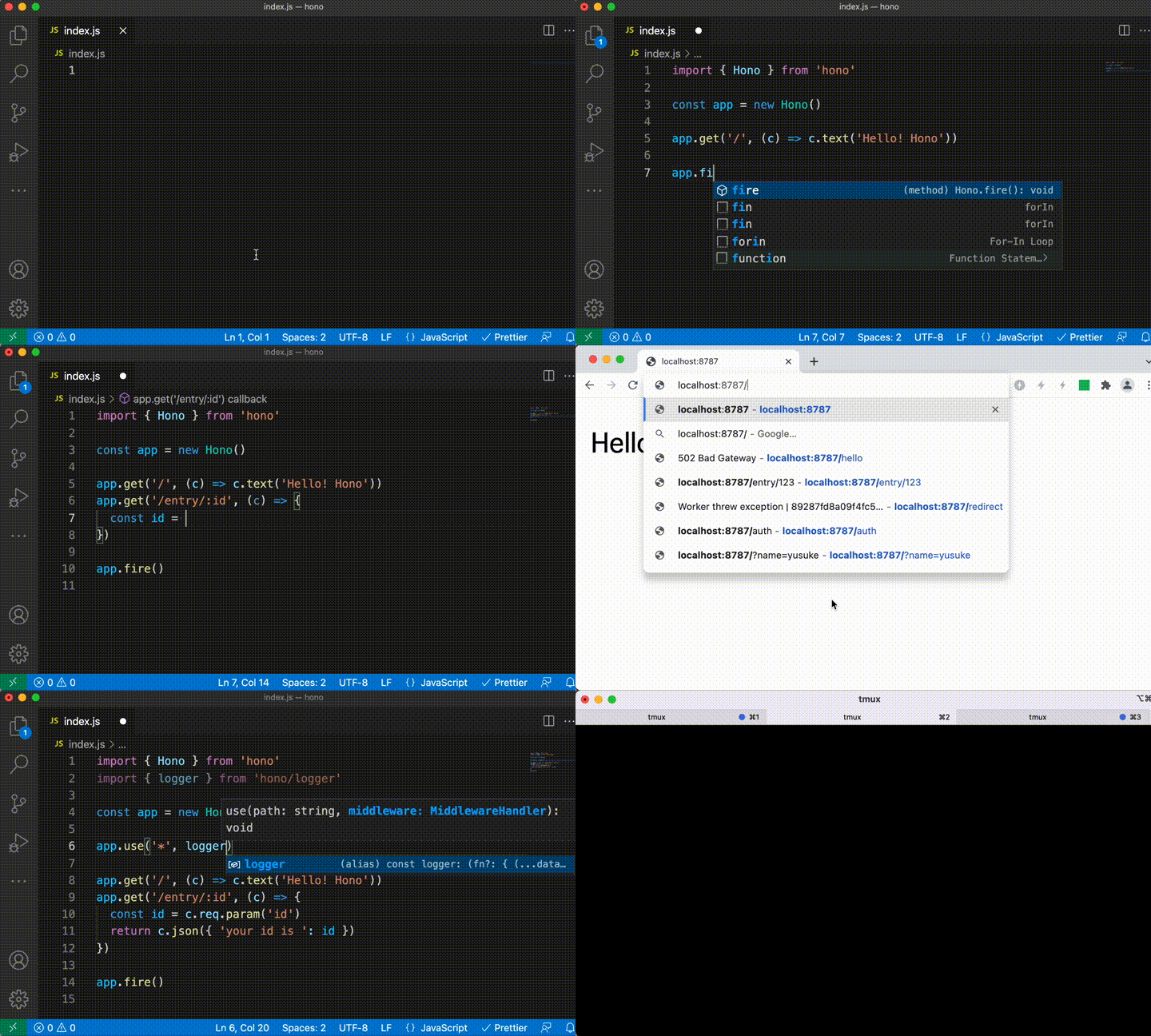
A demonstration to create an application of Cloudflare Workers with Hono.
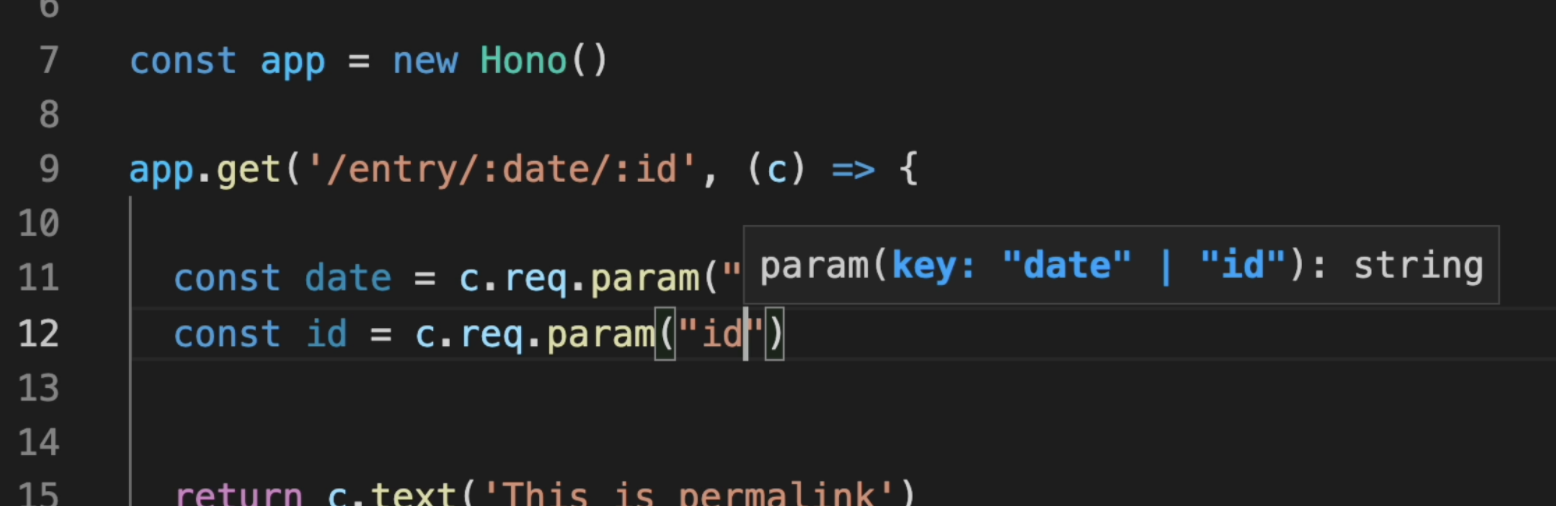
Now, the named path parameter has types.
Install
You can install Hono from the npm registry.
$ yarn add hono
or
$ npm install hono
Methods
An instance of Hono has these methods.
- app.HTTP_METHOD(path, handler)
- app.all(path, handler)
- app.route(path)
- app.use(path, middleware)
- app.notFound(handler)
- app.onError(err, handler)
- app.fire()
- app.fetch(request, env, event)
Routing
Basic
// HTTP Methods
app.get('/', (c) => c.text('GET /'))
app.post('/', (c) => c.text('POST /'))

// Wildcard
app.get('/wild/*/card', (c) => {
  return c.text('GET /wild/*/card')
})

// Any HTTP methods
app.all('/hello', (c) => c.text('Any Method /hello'))
Named Parameter
app.get('/user/:name', (c) => {
  const name = c.req.param('name')
  ...
})
Regexp
app.get('/post/:date{[0-9]+}/:title{[a-z]+}', (c) => {
  const date = c.req.param('date')
  const title = c.req.param('title')
  ...
})
Nested route
const book = app.route('/book')
book.get('/', (c) => c.text('List Books')) // GET /book
book.get('/:id', (c) => {
  // GET /book/:id
  const id = c.req.param('id')
  return c.text('Get Book: ' + id)
})
book.post('/', (c) => c.text('Create Book')) // POST /book
no strict
If strict is set false, /helloand/hello/ are treated the same.
const app = new Hono({ strict: false }) // Default is true

app.get('/hello', (c) => c.text('/hello or /hello/'))
async/await
app.get('/fetch-url', async (c) => {
  const response = await fetch('https://example.com/')
  return c.text(`Status is ${response.status}`)
})
Middleware
Builtin Middleware
import { Hono } from 'hono'
import { poweredBy } from 'hono/powered-by'
import { logger } from 'hono/logger'
import { basicAuth } from 'hono/basicAuth'

const app = new Hono()

app.use('*', poweredBy())
app.use('*', logger())
app.use(
  '/auth/*',
  basicAuth({
    username: 'hono',
    password: 'acoolproject',
  })
)
Available builtin middleware are listed on src/middleware.
Custom Middleware
You can write your own middleware.
// Custom logger
app.use('*', async (c, next) => {
  console.log(`[${c.req.method}] ${c.req.url}`)
  await next()
})

// Add a custom header
app.use('/message/*', async (c, next) => {
  await next()
  await c.header('x-message', 'This is middleware!')
})

app.get('/message/hello', (c) => c.text('Hello Middleware!'))
Not Found
app.notFound for customizing Not Found Response.
app.notFound((c) => {
  return c.text('Custom 404 Message', 404)
})
Error Handling
app.onError handle the error and return the customized Response.
app.onError((err, c) => {
  console.error(`${err}`)
  return c.text('Custom Error Message', 500)
})
Context
To handle Request and Reponse, you can use Context object.
c.req
// Get Request object
app.get('/hello', (c) => {
  const userAgent = c.req.headers.get('User-Agent')
  ...
})

// Shortcut to get a header value
app.get('/shortcut', (c) => {
  const userAgent = c.req.header('User-Agent')
  ...
})

// Query params
app.get('/search', (c) => {
  const query = c.req.query('q')
  ...
})

// Captured params
app.get('/entry/:id', (c) => {
  const id = c.req.param('id')
  ...
})
Shortcuts for Response
app.get('/welcome', (c) => {
  // Set headers
  c.header('X-Message', 'Hello!')
  c.header('Content-Type', 'text/plain')
  // Set HTTP status code
  c.status(201)
  // Return the response body
  return c.body('Thank you for comming')
})
The Response is the same as below.
new Response('Thank you for comming', {
  status: 201,
  statusText: 'Created',
  headers: {
    'X-Message': 'Hello',
    'Content-Type': 'text/plain',
    'Content-Length': '22',
  },
})
c.text()
Render texts as Content-Type:text/plain.
app.get('/say', (c) => {
  return c.text('Hello!')
})
c.json()
Render JSON as Content-Type:application/json.
app.get('/api', (c) => {
  return c.json({ message: 'Hello!' })
})
c.html()
Render HTML as Content-Type:text/html.
app.get('/', (c) => {
  return c.html('<h1>Hello! Hono!</h1>')
})
c.notFound()
Return the 404 Not Found Response.
app.get('/notfound', (c) => {
  return c.notFound()
})
c.redirect()
Redirect, default status code is 302.
app.get('/redirect', (c) => c.redirect('/'))
app.get('/redirect-permanently', (c) => c.redirect('/', 301))
c.res
// Response object
app.use('/', (c, next) => {
  next()
  c.res.headers.append('X-Debug', 'Debug message')
})
c.event
// FetchEvent object
app.use('*', async (c, next) => {
  c.event.waitUntil(
    ...
  )
  await next()
})
c.env
// Environment object for Cloudflare Workers
app.get('*', async c => {
  const counter = c.env.COUNTER
  ...
})
fire
app.fire() do this.
addEventListener('fetch', (event) => {
  event.respondWith(this.handleEvent(event))
})
fetch
app.fetch for Cloudflare Module Worker syntax.
export default {
  fetch(request: Request, env: Env, event: FetchEvent) {
    return app.fetch(request, env, event)
  },
}

/*
or just do:
export default app
*/
Cloudflare Workers with Hono
Using wrangler or miniflare, you can develop the application locally and publish it with few commands.
Let's write your first code for Cloudflare Workers with Hono.
1. Install Wrangler
Install Cloudflare Command Line "Wrangler".
$ npm i @cloudflare/wrangler -g
2. npm init
Make a npm skeleton directory.
mkdir hono-example
cd hono-example
npm init -y
3. wrangler init
Init as a wrangler project.
$ wrangler init
4. npm install hono
Install hono from the npm registry.
$ npm i hono
5. Write your app
Only 4 lines!!
import { Hono } from 'hono'
const app = new Hono()

app.get('/', (c) => c.text('Hello! Hono!'))

app.fire()
6. Run
Run the development server locally. Then, access http://127.0.0.1:8787/ in your Web browser.
$ wrangler dev
7. Publish
Deploy to Cloudflare. That's all!
$ wrangler publish
Starter template
You can start making your application of Cloudflare Workers with the starter template. It is a realy minimal using TypeScript, esbuild, and Miniflare.
To generate a project skelton, run this command.
$ wrangler generate my-app https://github.com/yusukebe/hono-minimal
Related projects
Implementation of the original router TrieRouter is inspired by goblin. RegExpRouter is inspired by Router::Boom. API design is inspired by express and koa. itty-router, Sunder, and worktop are the other routers or frameworks for Cloudflare Workers.
- express https://github.com/expressjs/express
- koa https://github.com/koajs/koa
- itty-router https://github.com/kwhitley/itty-router
- Sunder https://github.com/SunderJS/sunder
- goblin https://github.com/bmf-san/goblin
- worktop https://github.com/lukeed/worktop
- Router::Boom https://github.com/tokuhirom/Router-Boom
Contributing
Contributions Welcome! You can contribute by the following way.
- Write or fix documents
- Write code of middleware
- Fix bugs
- Refactor the code
- etc.
Let's make Hono together!
Contributors
Thanks to all contributors!
Author
Yusuke Wada https://github.com/yusukebe
License
Distributed under the MIT License. See LICENSE for more information.